Building a website often starts with something simple. You just need a contact form. But then you start looking for an affordable form builder plugin, and the choices are overwhelming.
You head to the WordPress plugin directory or Google and see dozens of options, each promising to be the best. For many website owners, this search quickly becomes confusing. Most users started with a basic contact form and got lost in a sea of plugins with different pricing tiers.
Another common headache is hidden costs. You might install a plugin that seems free. Then you find out you need to buy paid add-ons for simple things like file uploads or connecting to your CRM. So in this article, I will give you clear ideas on the most affordable WordPress form plugins.
Table of Contents
The Struggle to Find Affordable Form Builder
Every form plugin says it’s the best at something. Some focus on being easy to use. Others talk about their advanced features. New users often jump from one plugin to another, finding that each one is missing something important.
For example, you might just need a simple contact form, but end up with a plugin full of extras or one that limits your fields. The huge number of options can make you feel stuck. It’s hard to tell which plugin truly offers good value without paying for a bunch of fluff.
Hidden Costs and Complicated Prices
Even well-known plugins can be a letdown when you look at their pricing. Many plugins lock useful fields or integrations behind their premium plans. You might think you found a great deal, but then you see the plan doesn’t support file uploads or multi-step forms without upgrading to a higher plan.
Most paid plugins often sell their add-ons. You could buy a plugin and then find out you need three or four more extensions to get everything you want. This can push the cost way higher than you expected. This hidden pricing makes it hard to budget and can feel like a trap.
What You Are Going to Learn
How to find form builder plugins that give you the best value for your money.
Which features are most important, and how to check them in free vs. paid plans.
Tips for choosing a plugin that fits your budget without giving up the functions you need.
This guide will help you navigate these frustrations. I will highlight five popular form builder plugins that aim to solve these problems. We’ll talk about how affordable they are, their main features, and how they work in the real world. By the end, you’ll see which plugins give you the most for your money so you don’t overspend or miss out.
What “Affordable” Really Means for WordPress Users
Affordable isn’t just about a low price; it’s about getting good value. A free-form builder plugin might look good at first, but it could be missing key features you need. A premium plugin might be expensive, but it could include so much that it covers all your needs in one package.
On the other hand, some paid plugins can be surprisingly expensive for similar features. Affordable really means you get what you need without paying for extras. If you pay for a plugin, it shouldn’t feel like you’re buying the whole store when you just needed one item.
No plugin will do everything you want, and the best plugin for you is the one you enjoy using the most. So focus on what you need, not all the possible features.
When you compare plugins, make a list of the core features you need (for example, a drag-and-drop builder, file uploads, payment fields, etc.). Check which features come with the free version and which ones require an upgrade. Also, think about how easy it is to use and the support available.
A premium plugin can be worth it if the plugin saves you time and frustration. Use this as your guide: look at plugins based on the functions you require, the long-term costs, and how well they solve your specific problems.
The Search for the Best Affordable Form Plugin
Picking the right form builder often feels like a journey. You might start with a plugin that seems perfect, only to discover it’s missing a key feature. Then you switch to another one, which might be too complex or cost too much. This process of trial and error can be really frustrating.
Most Affordable WordPress Form Plugins: Solving the Struggles
Many users find the best fit through trying them out. They ask themselves questions: Did the free version give me all the fields I needed? Did I have to buy a bunch of separate extensions? Was the plugin easy to use? After a few tests, you’ll start to get a feel for which plugins respect your budget. The winner is the one that offers enough functionality for your core needs without pushing you to buy every extra feature.
⚡ Affordable Form Plugins: Quick View ⚡
Feature/Plugin
Bit Form
Fluent Form
Formidable Forms
Ninja Forms
FormGent
Pricing Starts
$29
$63
$39.50
$59.40
$39
Drag & Drop Builder
✅
✅
✅
✅
✅
Multi-step Form
✅
✅
✅
Add-on
✅
Conversation Form
✅
✅
✅
❌
✅
Payment Fields
✅
✅
✅
Add-on
✅
Integrations
50+ built-in + 150+ via Bit Integrations (Free)
56
Native + Addon
Add-on
10+ All Free
Form Abandonment
✅
✅
✅
Add-on
✅
Spam Protection
✅
✅
✅
✅
✅
Performance
Lightweight (15 KB CSS)
48.5 KB
46.99 KB
259.3 KB
120.8 KB
Custom Styling
✅
✅
✅
Add-on
✅
Conditional Logic
✅
✅
✅
Add-on
✅
Advanced File Upload
✅
✅
✅
Add-on
✅
Entry Management
✅
✅
✅
✅
Coming Soon
Now, let’s look at five popular form builder plugins and see how they deal with these common struggles.
1. Bit Form: Most Affordable WordPress Form Builder Plugin
Finding an affordable WordPress form plugin sounds simple. But most people realize the truth as soon as they start testing options. You install a free plugin hoping it will cover the basics.
Then you find that simple features like file uploads, conditional logic, and payment fields are locked behind upgrades. Some plugins even require several paid add-ons before they become usable.
That’s when the frustration begins. You switch from one tool to another, trying to avoid hidden costs. Every plugin looks good at first, but many limit the features that actually matter. Before long, a small task like creating a contact form becomes a confusing hunt for fair pricing.
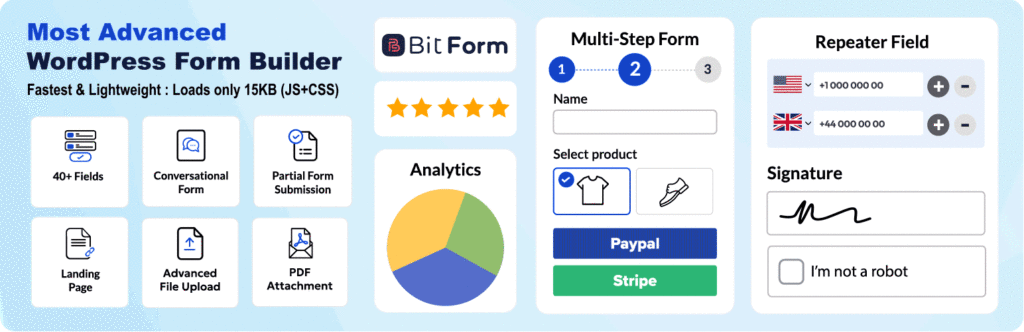
Bit Form changes that experience. It does not split essential features into expensive bundles or force you into buying multiple extensions. Instead, it offers strong core features from the start. The free plan includes a modern drag-and-drop builder, 38 field types, multi-step forms, file uploads, conversational layouts, advanced conditional logic, and more than 50 built-in integrations.
You can also connect to over 150 apps through Bit Integrations. And with a core script of only about 15 KB, your forms load fast.
Bit Form delivers a lot of value upfront. You get powerful tools without being pushed into unexpected upgrades. And if you ever want more advanced options, such as more advanced fields, additional conditions, or enhanced form styling, the Bit Form Pro plan gives you access to everything at a very friendly price.
For many users, this combination of value and flexibility makes Bit Form one of the most practical and cost-effective WordPress form builders available today.
2. Fluent Forms: Easy to Use with Powerful Features
Fluent Forms is known for its generous free version. Its free plan gives you an intuitive drag-and-drop builder, over 25 field types, conditional logic, and even conversational form features. Many bloggers and small businesses find that Fluent’s free version covers their needs right out of the box. The interface is clean and easy to use, which is a big help for beginners.
When you need more advanced features, Fluent Forms has a premium upgrade. The paid plan (around $47/year for one site) adds over 60 integrations (including advanced CRMs, Mailchimp, etc.) and features like multi-step forms, quiz modules, and geolocation fields.
If you do outgrow the free version, Fluent Forms’ pricing is clear and all-inclusive for features, which can still be a good value.
3. Formidable Forms: Advanced Solutions for Complex Forms
Formidable Forms is made for power users who need to build complex forms and applications. It’s great for things like directories, calculators, quizzes, and surveys. You can build forms that show submitted data in lists or charts, and even create custom post types from form entries.
However, Formidable comes with a higher price tag. Its plans start at around $149/year for the basic package. The full package, with all add-ons and premium templates, can cost much more (up to $599/year). The free (Lite) version is quite limited in comparison. You can make basic forms with it, but advanced fields like payments or Views require paid add-ons.
Formidable is a good solution if you really need those advanced capabilities, like a quote calculator or a user-submitted directory. It means you trade some affordability for advanced power. For users with complex needs, it can be worth the cost. But for a typical site that just needs a contact form or survey, Formidable’s high price can seem like too much.
4. Ninja Forms: Modular Pricing for Custom Form Needs
Ninja Forms uses a modular pricing model. The main plugin is free and lets you create basic forms with common fields like name, email, and checkboxes. It allows unlimited submissions in the free version and includes spam protection with reCAPTCHA. This makes it a solid choice for beginners or sites that only need a simple form.
When you need more, Ninja sells add-ons individually. For example, if you want to process payments, you buy a Stripe or PayPal extension. If you want multi-page forms, you buy the Multi-Part Forms add-on. This pay-as-you-go approach means you can keep your initial costs low. WPBeginner notes that Ninja Forms’ strength is in its “free core” and its “buy only the extensions you need” model.
The downside is that the costs can add up. If you end up needing several features, the total price might be more than a flat-rate alternative. Ninja Forms pricing starts at $29 per year for small bundles of add-ons, going up to $499/year for an all-access pass.
Overall, Ninja Forms is ideal if you just want a basic form and only plan to buy one or two extras later. It’s affordable at the start, but you should keep a close eye on what you really need to avoid surprise expenses.
FormGent is a lightweight AI-powered form builder plugin that is known for offering a handful of powerful features and integrations in the free version. It is a native builder based form plugin that requires zero learning to get started and profoundly supports embedding forms on non-WordPress sites using an iFrame.
On the Pro plan, FormGent offers numerous features like Webhooks, Unlimited AI form creation and Custom CPT submission. The pricing starts below $40 a year for a single site generally and during BFCM it even drops close to $25 a year which is very reasonable.
You can avail both annual and Lifetime plans as per your need and acquire an unlimited site license if you work with a lot of WordPress sites. According to their website information, lifetime plan users are entitled to all future upgrades and feature releases without any further payments.
Many users fall into the free but not really free trap. A free-form builder might seem good enough until you realize it’s missing a key feature. For example, a free plugin might let you create a form but not have a file upload field or conditional logic. Suddenly, you find you have to upgrade to build even a slightly complex form. This is the hidden cost of free plugins.
Paid plugins can have hidden costs, too. Some sell their add-ons one by one. You might pay for the base plugin, then pay again for each payment gateway, spam checker, or multi-step module. All these add-ons can turn a cheap-looking plugin into an expensive one.
The solution is to always compare feature lists. Check what each plugin’s free version includes. Then see exactly what you have to pay for. For example, Bit Form’s free version already includes conditional logic, conversational forms, and over 38+ field types.
You only pay extra if you need some special features. In contrast, Ninja Forms requires paid add-ons for things like payments and multi-page forms. This means more expenses if you need them.
Why Bit Form is the Most Affordable Form Plugin
Bit Form really stands out as a budget-friendly solution. It tackles the pain of overpaying for extra addons. Unlike some plugins that hide features behind expensive plans, Bit Form includes all features in all the paid plans.
You get a full-featured drag-and-drop builder, file uploads, multi-column layouts, Google reCAPTCHA, and multi-step forms without paying any extras. It delivers what most websites need from day one.
Integrations are a big plus for Bit Form. It connects to over 50+ services like email marketing tools and CRM. And with the Bit Integrations plugin, it unlocks an incredible 150+ free integrations with tools like Slack, Discord, and AI Tools.
This is like having a Zapier subscription for free. For small businesses on a tight budget, being able to automate workflows without extra fees is a game-changer.
Performance is another key factor. Bit Form’s code is extremely light, only about 15 KB of CSS. This means your site stays fast, even with powerful forms. Many competitors are bulkier and can slow down your pages. Bit Form’s efficiency shows that being affordable can go hand in hand with quality design.
Bit Form is to be flexible and easy to use; it has a modern look and a strong feature set. For businesses and bloggers, Bit Form hits the right balance. It offers a lot for free and has an affordable premium plan that unlocks everything. If your budget is a top priority, Bit Form is an excellent pick. It proves you don’t have to overpay to get a professional form builder.
A Common Struggle: Paying for What You Don’t Need
It’s very easy to pay for features you will never use. For example, some form plugins sell a single “forms” bundle for a set price, and then charge separately for payment gateways, file uploads, and surveys. You might install what looks like a free contact form, then get surprised by dozens of extra fees. This common situation frustrates many users.
The solution is to set your priorities and be careful. Only pay for what you truly need. A small business site that only needs a contact form should not pay for a full suite of e-commerce features. Bit Form’s approach helps here.
Its free plan is already generous, and any paid plan unlocks all remaining features at once, rather than per add-on. You pay one price for complete functionality instead of in small pieces. This transparency means no surprise charges for extra features.
Think of it like this: would you rather subscribe to one plugin and get everything, or buy ten addons for each function? Bit Form’s one-package approach saves money in the long run. It stops the cycle of paying bit by bit and ensures you only pay for the form builder itself.
Conclusion: Solving the Form Builder Struggle
Finding the right form builder doesn’t have to empty your wallet or force you to settle for less. The plugins we looked at each take a different approach. Bit Form proves you can get a feature-rich form builder at a very affordable price.
In the end, it’s about value over price. Take a close look at what each plugin offers. If a plugin covers your main needs in its plan, that’s a big win.
Bit Form provides essential features and over 50+ integrations without payment, making it a standout solution. If your budget is a top concern, give Bit Form a try. It’s built to solve your form-building problems without forcing you to pay for things you don’t need.
Frequently Asked Questions
What are the most affordable WordPress form plugins?
Some of the most affordable WordPress form plugins include Bit Form, Fluent Forms, and Everest Forms. Bit Form is particularly cost-effective, offering a full suite of features like multi-step forms, advanced conditional logic, and 50+ integrations at a very competitive price.
Which WordPress form plugin offers the best value?
Bit Form offers the best value by providing a comprehensive set of features, including advanced fields, integrations, and automation tools at a budget-friendly price. It delivers strong functionality without the need for expensive add-ons, making it a great choice for users seeking value.
Are paid WordPress form plugins worth the investment?
Yes, paid WordPress form plugins often offer more advanced features, better support, and no hidden costs. Bit Form is a great example of an affordable plugin that includes essential features like file uploads, multi-step forms, and integrations without requiring expensive add-ons.
What features should I look for in an affordable WordPress form plugin?
Look for key features like drag-and-drop form builders, multi-step forms, payment processing, conditional logic, and integrations with CRMs and email marketing tools. Bit Form offers all of these essential tools at an affordable price, with an intuitive interface and seamless integration options.
Are there hidden costs with affordable WordPress form plugins?
Many form plugins have hidden costs for premium features or add-ons. Bit Form avoids this by offering a full set of essential features in its affordable plans, with clear pricing and no surprise fees for basic functionality.
Is Bit Form a good choice for budget users?
Yes, Bit Form is an excellent choice for budget-conscious users who need a comprehensive form builder. It provides powerful features like multi-step forms, file uploads, and integrations at an affordable price, making it a cost-effective solution for businesses of all sizes.
What is the best affordable WordPress form plugin for small businesses?
For small businesses, Bit Form is ideal due to its affordability and feature set. It provides everything you need for lead generation, customer interaction, and automation, all at a very reasonable price. The plugin’s integrations with popular tools like CRMs and email marketing platforms are a significant bonus.
Can I build advanced forms with affordable WordPress plugins?
Yes, Bit Form allows you to build advanced forms with features like conditional logic, multi-step forms, and file uploads, all included in its affordable pricing plans. It’s perfect for users who need more than just basic forms without breaking the budget.
Have you ever visited a website, tried to use a plugin or service, and felt completely stuck because there was no documentation page on the site? This problem is not only frustrating for users, but it slowly becomes a nightmare for site owners, too. Let me be honest with you, I’ve been in this situation […]
Imagine building your dream home. You could visit multiple stores, buying hammers from one shop, nails from another, and paint from a third. Or you could walk into one expert home improvement store that gives you everything you need at a fraction of the cost. That’s exactly what WordPress plugin bundles offer, complete toolkits that […]
Imagine spending your days clicking and copy-pasting between apps, then discovering a plugin that handles all that work for you. WordPress automation plugins promise to connect your site, forms, and stores to hundreds of apps, triggering actions instantly when events occur. This saves bloggers, marketers, and developers countless hours. But with many tools on the […]
Cookie Consent
We use cookies to improve your experience on our site. By using our site, you consent to cookies.
This website uses cookies
Websites store cookies to enhance functionality and personalise your experience. You can manage your preferences, but blocking some cookies may impact site performance and services.
Essential cookies enable basic functions and are necessary for the proper function of the website.
Name
Description
Duration
Cookie Preferences
This cookie is used to store the user's cookie consent preferences.
30 days
This cookie is set by Cloudflare to help manage bot traffic and protect the website from malicious activity. It does not collect or store any personal data and is used solely for security and performance purposes.
Used by Google Analytics to determine which links on a page are being clicked
30 seconds
_ga_
ID used to identify users
2 years
_gid
ID used to identify users for 24 hours after last activity
24 hours
_gat
Used to monitor number of Google Analytics server requests when using Google Tag Manager
1 minute
__utmt
Used to monitor number of Google Analytics server requests
10 minutes
__utmb
Used to distinguish new sessions and visits. This cookie is set when the GA.js javascript library is loaded and there is no existing __utmb cookie. The cookie is updated every time data is sent to the Google Analytics server.
30 minutes after last activity
__utmc
Used only with old Urchin versions of Google Analytics and not with GA.js. Was used to distinguish between new sessions and visits at the end of a session.
End of session (browser)
__utmz
Contains information about the traffic source or campaign that directed user to the website. The cookie is set when the GA.js javascript is loaded and updated when data is sent to the Google Anaytics server
6 months after last activity
__utmv
Contains custom information set by the web developer via the _setCustomVar method in Google Analytics. This cookie is updated every time new data is sent to the Google Analytics server.
2 years after last activity
__utmx
Used to determine whether a user is included in an A / B or Multivariate test.
18 months
_ga
ID used to identify users
2 years
_gac_
Contains information related to marketing campaigns of the user. These are shared with Google AdWords / Google Ads when the Google Ads and Google Analytics accounts are linked together.
90 days
__utma
ID used to identify users and sessions
2 years after last activity
Clarity is a web analytics service that tracks and reports website traffic.