Having a form is important to getting leads and keeping people interested in websites, but many people leave forms blank before submitting them. This process of abandonment is called form abandonment, which may lead to lost customers and lower conversion rates. This issue can be fixed by capturing partial submissions that will save information even if the form isn’t fully filled out.
You can see what people filled out before they left, figure out where they might be having trouble, and, with that information, change how the form looks the next time they come back. You can also contact those who didn’t finish and encourage them to do so.
This guide will show you how to use the Bit Form plugin to allow partial entries in WordPress. This will help you get back lost leads and increase conversions.
Table of Contents
Understanding Partial Submissions
Partial entries save the information that people put into a form, even if they don’t send the whole thing. Imagine that someone starts to fill out a contact form by typing in their name and email address but then stops and leaves the page. This information would normally be lost. In cases where partial submissions are allowed, the data input is saved. Such information lets website owners know where visitors stop, so they can follow up or make changes to help people finish forms. You can get back possible leads and increase overall conversions by learning how users behave through partial submissions.
Common Reasons for Form Abandonment
Form abandonment can happen for many reasons. Having knowledge of these reasons can be used to minimize abandonment. The forms that are long and complicated or those without enough instructions are mostly left unfinished by the people. Forms are not user-friendly on mobile and those with technical difficulties, like loading slowly, may turn people away.
It is less trustworthy to ask for too much personal information without a good reason. Other reasons are distractions, required fields that aren’t needed, and not enough success markers. Another important part is making sure that auto-save works; without it, users might not want to start over if they leave the page by accident. If you fix these problems, more people will finish your forms and be more interested in them.
Benefits of Enabling Partial Submissions
Allowing partial submissions in WordPress forms has several benefits that can greatly increase user interest and lead generation. These are some of the main benefits:
Recover Lost Leads: Keep track of potential customers’ information even if they don’t fill out the form. This way, you can reach out to them again later to get them interested. Figure out how users act: Find out which form areas people tend to leave blank, as this can help you figure out where problems or problems might be occurring.
Improve Form Design: Simplify and improve forms by using information from incomplete entries. This will make them easier to fill out and increase the number of people who do so.
Boost Conversion Rates: You can make the user experience better and get more forms fully filed by fixing problems that make people leave your site.
Follow-Up Opportunities: Send users who started a form but didn’t finish it helpful notes or prompts to get them to go back and finish it.
Better Decision-Making: Look at incomplete WordPress form submissions to learn how to improve the form’s content, style, or the whole process to get better results.
Best Practices to Make User-Friendly Forms
Make sure the forms are easy to submit, this will attract more people to complete the form. Always keep the forms short and only ask the most needed questions. Place them in order, and if a form has many steps, then definitely use a multi-step form or a progress bar to show the users how far they have gone. Make sure that your forms are readable on mobile devices: make the text large and the buttons easy to click.
Users will know what to do if you use simple signs and labels that are easy to read. Let people save their work automatically or only partially, so they don’t lose it. Use conditional logic to keep questions relevant and only make fields needed when they need to be. Trust signs, like privacy notices, should be included, and your forms should be tested often to get the best results.
How to Enable Partial Submissions in WordPress with Bit Form
Capturing user data from incomplete WordPress form submissions can significantly improve lead recovery and conversion rates. Here’s how to set up and enable form abandonment and partial submissions in WordPress using Bit Form:
1. Install and Activate Bit Form
Start by navigating to your WordPress dashboard>Plugins > Add New. Search for “Bit Form”, click Install, and then Activate. This will enable Bit Form on your site for creating and managing forms.
2. Create or Edit a Form
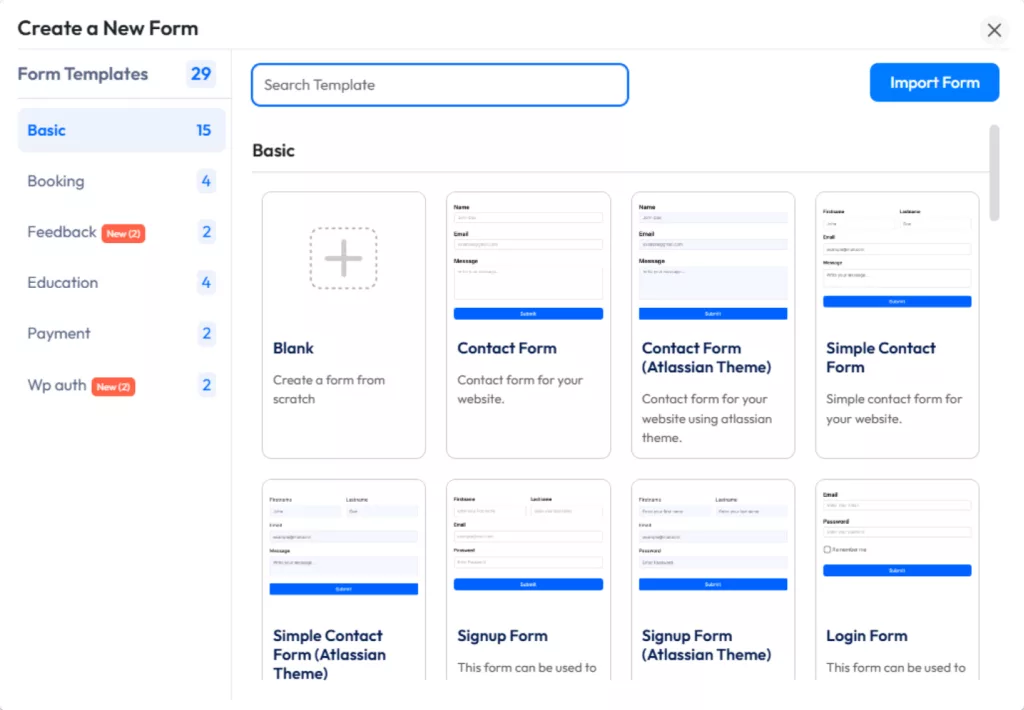
Once activated, click on Bit Form in your dashboard menu. Choose Add New Form to create a new form or edit an existing one. You can also choose a template to quickly start.
3. Enable Form Abandonment for Partial Submissions
Go to the Settings tab within the form editor and find the Form Settings section.
Enable Form Abandonment. This ensures user data is saved automatically, even if the form isn’t fully submitted. This core feature captures valuable user information for follow-ups.
Add a customizable warning message below the form description to inform users that their data will be saved (to client-server or local storage) before submission.
The description will show like this. You can change the warning message.
4. Save Drafts for Logged-in Users
You can enable the “Save Draft” feature, which functions when users are logged in. This allows users to begin filling out a form on one device and continue on another, offering flexibility and convenience.
5. Repopulate Form Fields
For logged-in users, any incomplete form will repopulate with their previous partial entries from the database. For non-logged-in users, the browser’s local storage will be used to repopulate fields.
Note: Ensure the “Save Draft” option is enabled for this feature.
6. Drafts Saved on Navigation
When a user navigates away or closes the form tab, their entries are saved. This makes it easier for users to pick up where they left off when they return to the form.
Important: Form Abandonment does not work in private browsing. For logged-in users, drafts are stored on the server, which allows data recovery across sessions.
7. Optional: Configure Notifications
Set up email notifications to alert you when a partial submission is captured. You can also send follow-up emails to encourage users to return and complete their forms. This step is optional but effective for increasing engagement.
8. Save and Publish Your Form
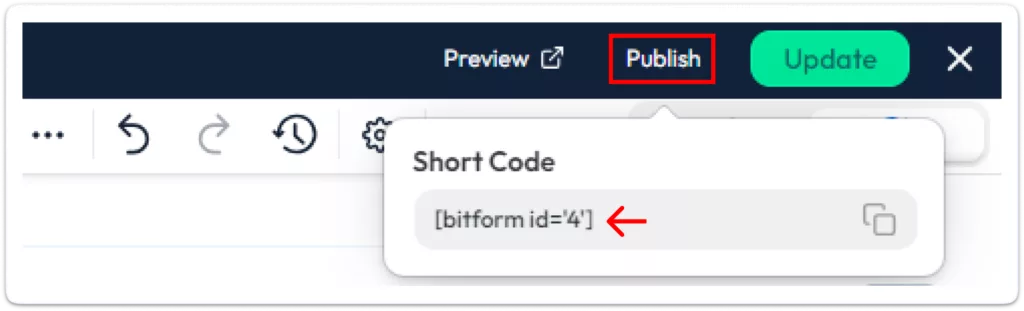
After configuring the form, click Update to apply your changes. To make the form live, use the shortcode provided by Bit Form and embed it in your chosen page, post, or sidebar. Once published, partial submissions will be captured automatically.
By following these steps, you can easily get form abandonment solution and partial submissions to track user behavior and improve your conversion rates.
Conclusion
For improving form completion and catching incomplete submissions in WordPress, Bit Form is a great plugin. You can make interactive and user-friendly forms that keep users interested and increase conversions with tools like conditional logic, multi-step forms, and conversational form.
Businesses that want to improve their lead creation will love how easy it is to integrate and how flexible the customization options are. Simply use Bit Form to make creating forms easier, get more leads, and grow your business effectively.
Frequently Asked Questions (FAQ)
What is form abandonment, and why does it happen?
Form abandonment is when a person starts filling out a form and then leaves the form without completing it. It occurs due to long forms, confusing ones, or difficult forms to fill out, while at times users get distracted.
How can I recover lost leads from abandoned forms?
Saving incomplete entries allows for the recovery of lost leads. You’re able to see what’s been entered after a person has left and follow up with them so that they can complete the form.
What are partial submissions, and how do they work?
Whenever a user gets to your form, and does not submit it completely, the information they are supposed to enter on it gets saved. If they put their names and email addresses, then leave; this information is saved for you to get in touch with them later or make the form better.
Can I track partial submissions in WordPress forms?
Yes, with the Bit Form plugin, you’re able to see what people filled out before they left. That way, you will know where the problems are so you may improve those points.
What are the common reasons users abandon forms?
People don’t fill out forms if they are too long, don’t work on mobile devices, ask for too much information, take too long to load, or don’t have useful tools like auto-save.
Whenever any visitor lands on your website, while browsing, at some point, they might need help. Say, it can be about product details, best pricing plan, troubleshooting, collaboration procedure, or anything. So, do you really think they’ll find your email address and wait for your reply? The straight answer is NO. Instead, in 2026, people […]
When you need to collect leads, there are many ways to do it, including paid marketing. However, if you already have a website with traffic, popup marketing is one of the most effective methods. You never know when your website’s organic traffic might decline. Also, a single visit doesn’t guarantee that a visitor will return. […]
The online food market is booming more than ever, and home-based bakeries are riding the wave. With so many people now ordering their favorite treats from the comfort of home, the demand for baked goods has never been higher. The global online food delivery market is projected to reach $505 billion by 2030. And with […]
Cookie Consent
We use cookies to improve your experience on our site. By using our site, you consent to cookies.
This website uses cookies
Websites store cookies to enhance functionality and personalise your experience. You can manage your preferences, but blocking some cookies may impact site performance and services.
Essential cookies enable basic functions and are necessary for the proper function of the website.
Name
Description
Duration
Cookie Preferences
This cookie is used to store the user's cookie consent preferences.
30 days
This cookie is set by Cloudflare to help manage bot traffic and protect the website from malicious activity. It does not collect or store any personal data and is used solely for security and performance purposes.
Used to monitor number of Google Analytics server requests when using Google Tag Manager
1 minute
__utmt
Used to monitor number of Google Analytics server requests
10 minutes
__utmb
Used to distinguish new sessions and visits. This cookie is set when the GA.js javascript library is loaded and there is no existing __utmb cookie. The cookie is updated every time data is sent to the Google Analytics server.
30 minutes after last activity
__utmc
Used only with old Urchin versions of Google Analytics and not with GA.js. Was used to distinguish between new sessions and visits at the end of a session.
End of session (browser)
__utmz
Contains information about the traffic source or campaign that directed user to the website. The cookie is set when the GA.js javascript is loaded and updated when data is sent to the Google Anaytics server
6 months after last activity
__utmv
Contains custom information set by the web developer via the _setCustomVar method in Google Analytics. This cookie is updated every time new data is sent to the Google Analytics server.
2 years after last activity
__utmx
Used to determine whether a user is included in an A / B or Multivariate test.
18 months
_ga
ID used to identify users
2 years
_gali
Used by Google Analytics to determine which links on a page are being clicked
30 seconds
_ga_
ID used to identify users
2 years
_gid
ID used to identify users for 24 hours after last activity
24 hours
_gac_
Contains information related to marketing campaigns of the user. These are shared with Google AdWords / Google Ads when the Google Ads and Google Analytics accounts are linked together.
90 days
__utma
ID used to identify users and sessions
2 years after last activity
Clarity is a web analytics service that tracks and reports website traffic.