Most customer service software reviews are written by people who think customer support is replying “Sorry for the inconvenience!” and calling it a day.
I actually tested these platforms in the wild. Set them up. Broke them. Fixed them. Watched my team struggle with them. Stayed up way too late trying to figure out why the ticket system suddenly decided to eat 50 emails and pretend nothing happened.
The truth they hide in tiny font at the bottom: expensive doesn’t mean good, it usually just means complicated. Simple often beats sophisticated when you’re tired and just need to help someone. That cutting-edge AI feature? Sometimes it’s just really good at confidently giving wrong answers.
These seven tools made it into this guide because they survived real-world chaos. The kind of chaos where three things break at once, customers are rightfully annoyed, and you need the software to just do its job instead of becoming problem number four.
Table of Contents
What Customer Service Software Actually Does
Right now, you’re probably juggling chaos.
Emails are scattered across three inboxes. Chat messages in some widget you barely understand. Social media DMs in five different apps. Phone calls with zero context about who’s calling or why.
Customer service software consolidates that mess into one place. One dashboard. One login. One source of truth.
But it’s more than just organization. The good platforms are smarter than that.
They spot patterns you’d never see manually. Like how Tuesday afternoons always get slammed. Or how questions about Feature X take twice as long to resolve. With that data, you can actually fix things instead of just reacting.
The knowledge base feature is seriously underrated. You write a detailed article about password resets. Customers find it themselves. No ticket created. Your team handles real problems instead of answering the same question for the hundredth time.
And when someone does need personal help? The platform shows their complete history. Last purchase. Previous tickets. That angry email from three months ago. Your team has context before they even say hello.
The Non-Negotiables: What Separates Good from Garbage
After testing way too many platforms, I noticed patterns. The good ones share specific qualities.
Speed to competence matters more than features: If your newest hire can’t handle tickets within their first hour, the interface is too complicated. A 20-minute onboarding session should be enough. Anything more and you’re wasting time and money on training.
Automation should help, not hurt: Bad automation sends canned responses that make people angrier. Good automation handles repetitive tasks while humans focus on complex problems. There’s a massive difference between the two.
Team collaboration can’t be an afterthought: When Sarah hits a tricky technical question, she needs to pull in Marcus without forwarding eight emails and losing context. Internal notes, @mentions, and shared ticket views aren’t fancy features—they’re requirements.
AI needs to earn its keep: Most “AI-powered” platforms just dump a chatbot on your site and call it innovation. Real AI understands context, suggests relevant help articles, and knows when to shut up and let humans take over.
Analytics that actually inform decisions: Average response time is fine. But can you see that pricing questions take 4x longer than shipping questions? Or that Friday evenings have the worst satisfaction scores? Good platforms show you what to fix, not just what’s broken.
Integrations aren’t optional: Your support platform lives in an ecosystem. It needs to sync with your CRM, notify your team in Slack, and create tasks in your project manager when bugs get reported. Isolated tools create more problems than they solve.
Quick Comparison Table
Tool
Best For
Trial Period
Starting Price
ThriveDesk
Small teams want simplicity
14 days (no card)
$25/agent/month
Gorgias
E-commerce stores on Shopify
7 days free
$10/month (60 tickets)
Crisp
Startups needing all-in-one messaging
14 days free
Free plan available
Bit Assist
Multi-Channel Chat Widget for WordPress
Free version available
$29/year or $49 lifetime
Help Scout
Teams prioritizing collaboration
21 days free
$22/user/month
Freshdesk
Budget-conscious growing teams
Free up to 10 agents
$15/user/month
Tidio
Small businesses wanting live chat
7 days free
Free plan available
Zendesk
Large enterprises needing scale
14 days free
$19/agent/month
The 8 Best Customer Service Tools
1. ThriveDesk
What It Does Best: Keeps things simple for small teams
ThriveDesk doesn’t try to be everything to everyone. It picked a lane, small teams that need solid support tools without enterprise complexity, and absolutely nailed it. Many growing teams also consider ThriveDesk a reliable Intercom alternative when they want powerful support features without enterprise-level complexity or pricing.
I helped a friend set this up for their online store. 40 minutes from signup to answering the first customer question. Compare that to the week-long configuration nightmare some platforms require.
Why It Works
The interface makes intuitive sense. Settings are where you’d expect them. Features are clearly labeled. Your team doesn’t need a manual to figure it out.
The pricing won’t destroy your budget either. When you’re running a 5-person operation, spending $500+ monthly on support software feels ridiculous. ThriveDesk gets that reality.
Key Features
Unified inbox pulling email, chat, and social into one view
Live chat widget you can customize to match your brand
Knowledge base builder requiring zero coding skills
Smart routing that assigns tickets based on your rules
Mobile apps for handling support anywhere
Post-ticket satisfaction surveys built in
Deep WooCommerce and WordPress integration
The WooCommerce Advantage
If you’re running WooCommerce, pay attention to this part. ThriveDesk was built by the same people who created it, not outsourced to some third party who half-understands ecommerce.
Open a support ticket, and the customer’s complete order history appears right there. Shipping status? Visible. Need to process a refund? Do it without leaving the conversation.
Your team can modify orders, manage subscriptions, and check payment details without touching WordPress admin. It’s a WordPress helpdesk plugin where everything happens inside the ticket interface while the customer waits.
For WordPress sites, there’s WPPortal. It embeds your help center directly into your site without database queries. Your site stays fast because ThriveDesk handles the processing.
Other Integrations
Connects with Slack, Shopify, WordPress, WooCommerce, Webflow, Wix, Zapier, and more. That Zapier connection opens up thousands of additional possibilities.
The Good and Bad
Pros:
Incredibly fast learning curve
Affordable for small teams
Excellent support response times
Strong chat functionality
WooCommerce integration that actually works
Cons:
Reporting features are basic compared to enterprise tools
Fewer advanced features than larger platforms
Better suited for teams under 20 agents
Pricing
$25 per agent monthly with annual billing. 14-day free trial with no credit card required.
2. Gorgias
What It Does Best: Purpose-built for ecommerce support
Gorgias was designed specifically for online stores. Not adapted. Not modified. Built from scratch for ecommerce teams.
The Shopify integration is absurd in the best way. Every customer detail pulls automatically. Order status, shipping info, purchase history, cart abandonment data—it’s all there.
Why It Works
The macros (they call them templates) are smart. Not just canned responses. They pull dynamic data like order numbers and tracking links automatically. Your team personalizes responses in seconds instead of minutes.
Revenue attribution is killer. You can see which support interactions actually led to sales. That data justifies your support team’s existence when budget season rolls around.
Key Features
Native Shopify, Magento, and BigCommerce integration
Automated responses with dynamic order data
Revenue tracking per support interaction
Social media and SMS support in one place
Quick actions for refunds and exchanges
Performance analytics tied to sales impact
Automation That Makes Sense
The automation rules are straightforward. When a customer asks about their order, Gorgias automatically shows shipping status. When someone wants a refund, the refund button appears. No complex workflows needed.
You can also automate common actions. “Where’s my order?” questions get handled instantly with real tracking data. Your team focuses on actual problems.
Integrations
Shopify, Magento, BigCommerce, Facebook, Instagram, SMS, Klaviyo, Recharge, and most ecommerce tools worth using.
The Good and Bad
Pros:
Built specifically for ecommerce
Revenue attribution proves ROI
Shopify integration is seamless
Macros save massive amounts of time
Social commerce support is strong
Cons:
Expensive if you’re not doing e-commerce
Ticket-based pricing can get pricey at scale
Less useful for non-retail businesses
Pricing
Starts at $10/month for up to 60 tickets. Scales to $25/month (300 tickets), $60/month (2,000 tickets), and up from there. 7-day free trial available.
3. Crisp
What It Does Best: All-in-one messaging platform for modern startups
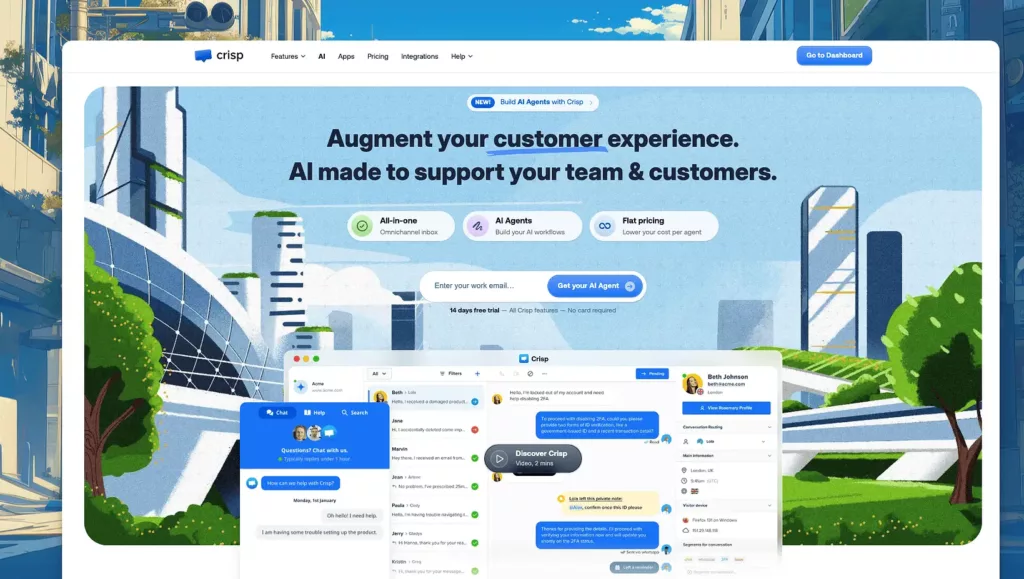
Crisp takes a different approach than traditional customer service software. Instead of focusing on tickets and email, they bet everything on messaging. Chat, social media, email—it’s all conversations, not tickets.
The platform feels modern. Like something built in 2026, not 2016. Clean interface, fast loading, intuitive design.
Why It Works
The shared inbox approach treats every channel the same way. A message from Facebook Messenger sits next to one from email sits next to live chat. Your team doesn’t think in channels—they think in conversations.
The free plan is genuinely good. Not a neutered trial. You get unlimited conversation history, two team members, and most core features. That’s rare.
Key Features
Unified inbox for all messaging channels
Live chat with co-browsing capabilities
Chatbot builder with automated responses
Knowledge base integrated into chat widget
Audio and video calls are directly in conversations
Status page for service updates
CRM functionality built in
Mobile apps for iOS and Android
The Messaging-First Advantage
Crisp doesn’t force conversations into ticket structures. When a customer reaches out, it’s just a conversation. Your team can switch from chat to video call seamlessly. Send files. Share screens. Like talking to someone on your phone, but better.
The chatbot builder is surprisingly powerful for the price. Visual workflow editor. Trigger bots based on visitor behavior. Capture leads while your team sleeps. No coding required.
Integrations
Connects with Slack, WordPress, Shopify, Facebook Messenger, Instagram, WhatsApp, Telegram, email, and more. Zapier connection adds thousands of possibilities.
The Good and Bad
Pros:
Generous free plan for small teams
Modern, clean interface
Messaging-first approach feels natural
Chatbot builder is solid
Co-browsing and video calls included
Fast and responsive platform
Cons:
Not ideal for traditional ticket-based workflows
Advanced features require paid plans
Reporting is less detailed than enterprise tools
Better for startups than large enterprises
Pricing
Free plan for up to 2 team members. Pro plan starts at $25/month per workspace (unlimited conversations). More advanced plans are available for larger teams.
4. Bit Assist (WordPress Plugin)
What It Does Best: Adds multi-channel contact options to WordPress sites
Bit Assist focuses on one specific problem that many support tools ignore. Customers often leave because they do not see an easy way to reach you.
That’s exactly what Bit Assist solves. It is a user-friendly multi-channel chat plugin for WordPress. It solves a real problem. Like, when customers want to reach you, Bit Assist makes sure they can do it instantly through the channel they already use.
It allows website visitors to connect with the support team using their favorite platform in real time. It integrates with over 30+ platforms, which include popular chat apps like WhatsApp, Facebook Messenger, Telegram, forms, call buttons, live chat tools, and so on.
This WordPress chat plugin ensures faster communication, improved user experience, and conversion rate.
Why It Works
Did you know a huge portion of customers don’t contact support at all, even when they have a question or problem?
Not because they don’t need help, but because they don’t see a fast way to contact you, or the contact option feels too slow or formal. Bit Assist removes that hesitation. The widget is visible, lightweight, and easy to use. There’s nothing new for customers to learn. They click the channel they already use and start the conversation.
This makes Bit Assist especially effective for small to mid-sized teams that value responsiveness over complex workflows.
Key Features
Integrates 30+ various channels like WhatsApp, Messenger, Telegram, Slack, SMS, live chat, and more
Custom contact forms inside the widget
WooCommerce integration for store-based interactions
Knowledge base and FAQ buttons for self-service
Google Analytics and built-in widget analytics
Business hours control and smart display triggers
Webhook support to send form data to third-party tools
Fully customizable design, including size, color, and position
Publish the widget beyond WordPress on other platforms, such as Drupal, Joomla, Wix, Shopify, Squarespace, Weebly, Zoho sites, And Others
The Multi-Channel Advantage
Bit Assist is focused on making communication easier for customers in the first place.
Instead of pushing every message into a ticket system, it gives visitors simple options right on your site. Someone with a quick question can use WhatsApp. Someone who needs more details can fill out a form. Someone who wants instant help can start a live chat.
Customers can choose what feels easiest to them. You continue replying through the platforms they already use.
The same widget can also be published on non-WordPress sites like Shopify, Wix, or Squarespace, which is useful for businesses running multiple websites.
Integrations
Works well with WordPress, WooCommerce, Google Analytics, and popular live chat tools like Tidio, Tawk, Crisp, and Intercom. Supports webhooks that allow sending form data to external platforms and automation tools.
The Good and Bad
Pros:
Extremely easy to set up and configure
Supports a large number of messaging channels
Very affordable
WooCommerce Integration
Google Analytics Integration
FAQ and knowledge base support
Useful for both customer support and lead generation
Cons:
WordPress Dependency
Not a Built-in Live Chat
Pricing
Starts at $29/year for 1 site. Lifetime plans are available, including unlimited site licenses for agencies.
5. Help Scout
What It Does Best: Makes team collaboration feel natural
Help Scout designed their platform around one core belief: support should feel human, not robotic. Every feature reflects that philosophy.
The result? Software your team actually enjoys using. Revolutionary concept, apparently.
Why It Works
The shared inbox is brilliant in its simplicity. Everyone sees every conversation. But collision detection prevents duplicate responses. Two people can’t accidentally answer the same ticket.
It feels like using email, not learning a complicated ticketing system. Your team gets productive immediately instead of spending days in training.
Key Features
Shared inbox with full team visibility
Collision detection prevents duplicate work
Docs knowledge base with a clean editor
Saved replies for common questions
Complete customer history in one view
Workflow automation for ticket routing
Real-time collaboration tools
Collaboration Done Right
The @mention system works like Slack. Tag someone in an internal note, and they get notified immediately. No forwarding tickets. No losing context.
Private notes let your team discuss complex issues without the customer seeing internal conversations. Everything stays in one thread.
Integrations
Connects with Slack, Salesforce, HubSpot, Shopify, Jira, Zapier, and about 100 other business tools. Integration setup is straightforward.
The Good and Bad
Pros:
Collaboration features are exceptional
Interface feels natural and intuitive
Knowledge base builder is excellent
The support team is genuinely helpful
Great for remote teams
Cons:
Less customizable than enterprise platforms
Costs more than some alternatives
Advanced features require higher plans
Reporting could be more robust
Pricing
$22 per user monthly on the Standard plan with annual billing. 21-day free trial to test everything.
6. Freshdesk
What It Does Best: Delivers enterprise features at startup prices
Freshdesk brings legitimate customer service software capabilities at prices small teams can afford. Part of the Freshworks suite, it’s built for teams wanting power without complexity.
The free plan is remarkable. Not a trial. Actually free. Up to 10 agents. Most companies charge for that.
Why It Works
Budget constraints are real. A lot of teams can’t spend $50+ per agent monthly. Freshdesk provides solid ticket management, AI assistance, and automation starting at $15/month per agent. Or free if you’re tiny.
The features compete with platforms costing double. Multi-channel support, automation, reporting—it’s all there without the enterprise price tag.
Key Features
Multi-channel ticketing across email, chat, phone, and social
Freddy AI for smart routing and suggestions
Team collaboration with shared ownership
SLA management and escalations
Freshchat for unified messaging
Gamification to motivate teams
Canned responses and automation
AI That Actually Helps
Freddy AI (their assistant) handles ticket routing intelligently. It suggests relevant help articles. Spots sentiment and flags angry customers. Pretty capable for the price point.
The automation builder lets you create rules without coding. Route tickets by keyword. Auto-respond to common questions. Escalate based on priority.
Integrations
Works with Slack, Salesforce, Shopify, Google Workspace, Microsoft Teams, Jira, Zapier, and most business tools.
The Good and Bad
Pros:
Free plan for up to 10 agents
Paid plans are very affordable
Ticket management is robust
Freddy AI works well
Good feature set for the price
Cons:
Interface looks slightly dated
Complex automations have learning curve
Some features feel basic compared to premium tools
Reporting could be more detailed
Pricing
Free for teams up to 10 agents. Growth plan starts at $15/agent monthly with annual billing. Higher tiers unlock advanced features.
7. Tidio
What It Does Best: Simple live chat with powerful automation
Tidio nailed the balance between simplicity and functionality. It’s primarily a live chat tool, but with enough automation and features to handle real customer service work.
The setup is ridiculously fast. Add a code snippet to your site and you’re chatting with customers in under 5 minutes. No complex configuration. No technical headaches.
Why It Works
The live chat widget looks good out of the box. You can customize colors and position, but the defaults work for most sites. It’s fast, responsive, and doesn’t slow down your pages.
The chatbot templates are practical. Common scenarios like collecting email addresses, qualifying leads, or answering FAQs come pre-built. Customize them or use as-is.
Key Features
Live chat widget with customization options
AI chatbot (Lyro) for automated responses
Email integration into shared inbox
Pre-made chatbot templates
Mobile apps for on-the-go support
Visitor tracking and analytics
Multi-language support
Integration with major platforms
The Automation Angle
Lyro, their AI chatbot, learns from your content and handles routine questions automatically. It’s not perfect, but it’s better than most budget-friendly AI solutions.
You can create custom bots using their visual builder. Set triggers based on visitor behavior. Someone on the pricing page for 30 seconds? Bot offers help. Someone abandons cart? Bot offers a discount. Simple but effective.
Integrations
Works with Shopify, WordPress, Wix, Squarespace, BigCommerce, Facebook Messenger, Instagram, and more. Zapier connection available for additional integrations.
The Good and Bad
Pros:
Extremely quick setup
Free plan is functional
Chat widget looks professional
Pre-built templates save time
Affordable pricing for small teams
Good for ecommerce sites
Cons:
Less robust than full support platforms
Email features are basic
Advanced features cost extra
Better as chat tool than full helpdesk
Pricing
Free plan includes 50 conversations/month and basic live chat. Starter plan at $29/month (100 conversations). Communicator plan at $25/month per operator for unlimited conversations.
8. Zendesk
What It Does Best: Enterprise-grade support at massive scale
Zendesk is the heavyweight champion of customer service software. They’ve been around forever. Power support for massive companies. Keep adding features every quarter.
It’s also complex as hell. But if you need serious horsepower and have the team to manage it, nothing else comes close to this level of capability.
Why It Works
The customization is insane. You can bend this platform into whatever shape your workflow needs. Want tickets to auto-escalate based on seventeen different criteria? Done. Need reports showing response times by agent, by day, by ticket type, by customer segment? Got it.
When you start with 10 agents and grow to 200, Zendesk handles it. Most customer support tools choke at scale. This doesn’t.
Key Features
Omnichannel support across every possible channel
AI-powered routing and automation
Customizable help center with multi-language support
Advanced analytics and reporting
App marketplace with 1,700+ integrations
Workflow automation at scale
Enterprise security and compliance
API for custom development
The Enterprise Advantage
Zendesk handles complexity that breaks other platforms. Multiple brands? Check. Multiple departments with different workflows? No problem. Hundreds of agents across different time zones? Built for it.
The reporting is incredibly detailed. You can drill down into any metric imaginable. Track individual agent performance. Analyze trends over time. Build custom dashboards.
Integrations
Connects to Salesforce, Slack, Jira, Microsoft Teams, Shopify, HubSpot, and basically every business tool that matters. If it doesn’t integrate natively, the API probably covers it.
The Good and Bad
Pros:
Handles massive scale easily
Reporting is incredibly detailed
App marketplace is huge
Enterprise security is solid
Highly customizable
Proven reliability
Cons:
Gets expensive quickly
Steep learning curve
Good features often need pricier plans
Can be overwhelming for small teams
Requires dedicated admin resources
Pricing
Suite Team starts at $19/agent monthly (billed annually). Suite Growth at $55/agent monthly. Suite Professional and Enterprise tiers available for larger organizations.
Making Your Decision
Forget finding the “best” software. Focus on finding the right fit for your specific situation.
Start with team size: Three people using enterprise software is overkill. Fifty agents on a basic platform will hit limits fast. Match the tool to your scale.
Consider your channels: If 90% of support happens via email, paying extra for advanced chat features is wasteful. Managing five channels? You need solid omnichannel capabilities.
Be honest about budget: Cheap software that frustrates your team costs more long-term than slightly expensive software that works smoothly. But don’t pay for enterprise features you’ll never use.
Test on mobile: Your team will use phones. Guaranteed. Make sure the mobile app works well during your trial. Clunky mobile experiences create problems.
Look at actionable analytics: Generic metrics are fine. Can you drill down into patterns? Can you spot specific bottlenecks? Good platforms show you what to fix, not just that something’s broken.
Use every free trial: All these platforms offer trials. Actually use them. Have your entire team test for at least a week. Real usage reveals deal-breakers that demos never show.
The right customer service software changes how your team operates. Agents feel less stressed. Customers get faster help. You stop worrying about dropped tickets.
Try the platforms. Involve your team. Pick what fits your workflow instead of forcing your workflow into the software.
Are you a WordPress user who has experienced the frustration of a slow-loading website, or wondered why perfectly designed pages are not climbing search rankings as they should? Many website owners and developers struggle with optimizing their online presence for both speed and visibility. Elementor is a hugely popular WordPress page builder. It has drag-and-drop […]
Building a WordPress site can be fast and fun with the right tools. You don’t need to write code to make beautiful pages. Modern drag and drop page builders let you design layouts by simply clicking and dragging elements on the screen. Many site owners use builders like Elementor, Beaver Builder, or Thrive Architect to […]
Page builder plugins made the website-building process very easy and effective. Elementor is one of the most popular and highly customizable WordPress page builder plugins. Elementor helps you create professional and attractive websites that will engage your visitors. You don’t need any coding knowledge to work with Elementor. But what if you need additional functions, […]
Cookie Consent
We use cookies to improve your experience on our site. By using our site, you consent to cookies.
This website uses cookies
Websites store cookies to enhance functionality and personalise your experience. You can manage your preferences, but blocking some cookies may impact site performance and services.
Essential cookies enable basic functions and are necessary for the proper function of the website.
Name
Description
Duration
Cookie Preferences
This cookie is used to store the user's cookie consent preferences.
30 days
Cookie Preferences
This cookie is used to store the user's cookie consent preferences.
30 days
This cookie is set by Cloudflare to help manage bot traffic and protect the website from malicious activity. It does not collect or store any personal data and is used solely for security and performance purposes.
ID used to identify users for 24 hours after last activity
24 hours
_gat
Used to monitor number of Google Analytics server requests when using Google Tag Manager
1 minute
__utmt
Used to monitor number of Google Analytics server requests
10 minutes
__utmb
Used to distinguish new sessions and visits. This cookie is set when the GA.js javascript library is loaded and there is no existing __utmb cookie. The cookie is updated every time data is sent to the Google Analytics server.
30 minutes after last activity
__utmc
Used only with old Urchin versions of Google Analytics and not with GA.js. Was used to distinguish between new sessions and visits at the end of a session.
End of session (browser)
__utmz
Contains information about the traffic source or campaign that directed user to the website. The cookie is set when the GA.js javascript is loaded and updated when data is sent to the Google Anaytics server
6 months after last activity
__utmv
Contains custom information set by the web developer via the _setCustomVar method in Google Analytics. This cookie is updated every time new data is sent to the Google Analytics server.
2 years after last activity
__utmx
Used to determine whether a user is included in an A / B or Multivariate test.
18 months
_ga
ID used to identify users
2 years
_gali
Used by Google Analytics to determine which links on a page are being clicked
30 seconds
_gac_
Contains information related to marketing campaigns of the user. These are shared with Google AdWords / Google Ads when the Google Ads and Google Analytics accounts are linked together.
90 days
__utma
ID used to identify users and sessions
2 years after last activity
Clarity is a web analytics service that tracks and reports website traffic.