If you are going to start a blogging site, business e-commerce or agency site in WordPress, you must need these WordPress automation tools and plugins to bring efficiency, consistency and reliability to your business. Currently, it is very hard to maintain a large number of blog entries and corporate websites manually. It is incredibly expensive and ineffective. One plugin alone has the power to alter the course of events and play a huge part in maintaining consistency for your WordPress website or business.
A variety of automation tools and plugins for various uses, such as SEO, social media, marketing and sales, content management, customer service, and so on, are covered here. Even here, I have included some integration plugins which are not themselves automation plugins, but rather tools and concepts that can be part of or interact with automated systems. In essence, they provide the non-coding connection of several programs on a single platform. It’s interesting, huh? Let’s get going.
What are WordPress automation tools and plugins?
WordPress automation tools and plugins are software components that integrate with the WordPress platform to perform tasks automatically, reducing the need for manual input and oversight. They are designed to simplify and streamline workflows, enhance functionality, and improve efficiency across various aspects of website management.
These are applications or services, often in the form of plugins, that handle repetitive tasks within a WordPress website without human intervention. They can also be third-party services that integrate with WordPress to automate actions between your site and other platforms or software. Examples include scheduling posts, automating SEO processes, running regular backups, and bulk uploading content.
Who may profit from WordPress automation tools and plugins?
Bloggers and Content Creators: Automation tools that assist with publishing content on a schedule, social media sharing, and SEO tasks can save time and help them reach a larger audience more efficiently.
E-commerce Site Owners: Automation can handle tasks like order processing, inventory management, email marketing, and customer follow-up for those who run online stores, which can improve the customer experience and increase sales.
Marketing Professionals: They often use automation to streamline campaign execution, lead generation, and conversion tracking, making their marketing efforts more effective.
Webmasters and Site Administrators: For routine site maintenance tasks such as backups, security checks, and database optimization, automation tools can ensure that these tasks are performed regularly without fail.
Developers and Agencies: Automation can help with development workflows, like staging to production migrations, content synchronization, and automated testing, which is crucial when managing multiple client sites.
Business Owners: They can benefit from automating various aspects of their website to enhance their online presence without needing to invest additional time or resources, allowing them to focus on core business operations.
Best WordPress automation tools and plugins
Automation in WordPress can save a significant amount of time and effort, especially when managing content, SEO, social media, and other repetitive tasks. Here’s a list of some of the best WordPress automation tools and plugins, categorized by their primary functions. In different categories, there are different WordPress automation tools and plugins in the market. For example, connector or integration plugins that will send data from a trigger (it could be a Form Builder) to any action (CRM tool like Google sheet, active campaign). Another one is social media automation, which will automatically post from your WordPress site to any social account. Thus, I will introduce you to different automation tools from different categories.
WordPress Integrations or Automation Plugins for Data Flow
WordPress automation plugins For SEO
WordPress Automation Plugins for Auto-posting in Social Media
WordPress Automation Plugin for Better Customer Support
In all categories, there are different kinds of WordPress automation tools available. I can guarantee you that the automation tools that I have included here are really incredible for newbies and pro users at the best affordable price.
WordPress Integrations or Automation Plugins for Data Flow
Bit Integrations
Bit Integrations is a WordPress plugin that allows you to automate tasks within your WordPress site. It can connect your WordPress site and other plugins or external apps. However, the Bit Integration automation plugin is designed to create automated workflows directly within your WordPress environment.
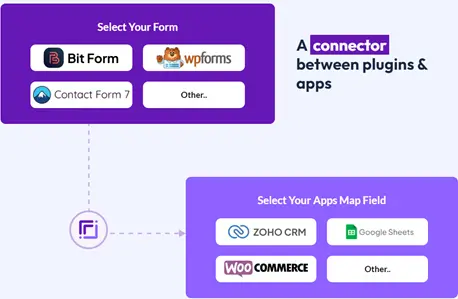
Bit Integrations works by setting up triggers (e.g., a user completes a form) and actions (e.g., they get added to an email list). It can connect different WordPress plugins without requiring any coding, making it a powerful tool for site administrators who want to automate tasks within their WordPress ecosystem.
Special features of Bit Integrations
No-Code Automation Inside WordPress: Bit Integrations allows you to create complex workflows inside your WordPress site without any coding knowledge. You can link your WordPress plugins and external apps with a simple process.
Integration with WordPress Plugins: It can connect commonly used WordPress plugins like WooCommerce, Fluent CRM, Autonami, and many others, creating automated sequences that would otherwise require custom programming.
Integrate with external software: You can integrate your desired plugins with 269+ popular applications like Google Sheets, MailChimp, Zoho CRM and many others with Bit Integrations.
Conditional Logic: This allows users to create rules that determine when certain integrations should be triggered. For example, you could set a condition to only add a user to a mailing list if they select a specific checkbox during signup.
Field Mapping: This feature enables users to connect data fields from WordPress to corresponding fields in external services. This is crucial for transferring data accurately, such as names, email addresses, and other user information
Uncanny Automator
This plugin is known for creating powerful automation without needing to write any code. It connects WordPress plugins and external tools easily, making it a good choice for non-developers. Uncanny Automator can connect 140+ apps and plugins with over 1000+ triggers and actions. Easy to integrate apps and plugins; even non-tech people can use it easily, but the price is a bit high.
Special features of Uncanny Automator
No-Code Solution: Create powerful automation without any coding knowledge.
Extensive Plugin Integration: It connects with many WordPress plugins seamlessly.
Recipe Creation: Uses a ‘recipe’ format for building automation workflows.
User-Driven Triggers: Automation can be triggered by user actions on the site.
AutomatorWP
This plugin offers a wide range of automation options, integrating with numerous WordPress plugins and third-party apps. It’s known for its flexibility and the ability to create complex workflows. AutomatorWP can integrate more than 120 WordPress plugins.
Special features of AutomatorWP
Wide Range of Integrations: Connects with many popular WordPress plugins and external apps.
Complex Workflows: Capable of handling intricate automation workflows.
Flexibility: It offers options for both simple and complex tasks.
Triggers and Actions: Supports numerous triggers and actions for comprehensive automation.
WP Fusion
It is focused more on marketing automation. WP Fusion Lite connects your WordPress site to various CRM and marketing automation tools. It’s great for syncing user data and automating user engagement.
Special features of WP Fusion
CRM and Marketing Automation Integration: Syncs WordPress data with various CRM and marketing tools.
User Engagement Automation: Automates tasks based on user interactions.
Access Control: Manages user access based on tags and CRM fields.
Lightweight Version: A more accessible version of the full WP Fusion plugin with core features. WP Fusion has a lite version. You can use it for free. In the pro version, they offer 50+ supported CRMs, and you can integrate 102+ plugins with WP Fusion. WP Fusion Plus and Professional offer 6 pro add-ons. But the price is a little bit higher than the others.
SureTriggers
This plugin focuses on automation based on user behavior on the site. It’s particularly useful for e-commerce and membership sites where user interaction triggers are crucial.
Special features of SureTriggers
User Behavior Triggers: Focuses on automation based on user actions and interactions.
E-commerce and Membership Optimization: Ideal for sites that require user interaction-based automation.
Customizable Triggers and Actions: These offer flexibility in automation setup.
Real-Time Response: Automations respond promptly to user actions. SureTriggers offers 300+ integrations with WordPress plugins. But they don’t offer API integrations in free and pro editions. They only offer it in the business edition, which is a bit pricy.
Other popular tools or plugins in this category
Thrive Automator: Part of the Thrive Suite, Thrive Automator is designed to integrate with other Thrive Themes tools for free. It’s ideal for users who are already using Thrive products and want to automate within that ecosystem.
FlowMattic: A newer entrant, FlowMattic stands out for its user-friendly interface and supports a variety of integrations. It’s particularly good for those who prefer a more visual approach to automation.
Final Thoughts on WordPress Integrations or Connectors
WP Fusion Lite is excellent for marketing automation, particularly if CRM connectivity is a top concern. Uncanny Automator excels in ease of use since it is straightforward and doesn’t require any coding knowledge.
For users of Thrive Themes, Thrive Automator is the obvious option. For Membership and E-Commerce Websites: SureTriggers’ user behavior-focused triggers would be advantageous.
For overall flexibility, Bit Integration might be the best due to its wide range of integrations and complex workflows at a lower price.
It can connect more than 200 apps and plugins in one platform. This includes social networking, payment methods, marketing, and more.
It emphasizes a no-code solution, meaning the plugin is user-friendly for non-programmers. This makes the plugin available to more WordPress site owners.
WooCommerce, Fluent CRM, and Autonomy plugins may automate customer inclusion to a CRM or email list upon purchase and synchronize user data and activity between your site and the CRM.
You can also integrate Google Sheets, MailChimp, and Zoho CRM to automatically export form submission data to a spreadsheet. Email list subscriptions may be automated with MailChimp. Zoho CRM may sync contact and sales data. Integration support is provided by professional technicians.
Bit Integrations is a sophisticated and affordable WordPress integration tool. It simplifies WordPress site integration with external services and workflow automation to improve site functionality and digital operations.
WordPress Automation Plugins For SEO
Rank Math Rank Math is a popular SEO plugin for WordPress that provides a suite of tools to improve your site’s search engine optimization. It’s known for its user-friendly interface, a wide range of features, and automation capabilities that help optimize your site’s content for search engines without needing extensive SEO knowledge
Special features of Rank Math
Automated SEO Analysis: Rank Math automatically checks your content against SEO best practices and provides actionable insights to improve your rankings.
Smart Suggestions: The plugin offers suggestions for optimizing your posts and pages as you write them.
Rich Snippets Support: It allows you to add schema markup to your content easily, which can enhance the way your pages appear in search results. XML Sitemap
Generation: Rank Math can automatically create and submit sitemaps to search engines, ensuring your site’s content gets indexed more quickly.
Social Media Integration: The plugin helps you optimize content for social media by allowing you to control how your content appears when shared.
404 Monitor: It tracks 404 errors on your website, allowing you to address or redirect missing content. Redirection Manager: Automates the process of creating and managing redirects on your website.
Local SEO Optimization: For businesses with a local presence, Rank Math can help optimize your site for local search results.
Integration with Google Search Console: Rank Math integrates directly with Google Search Console to bring important information right into your WordPress dashboard.
Automated Image SEO: The plugin can automatically add ALT and Title tags to your images, which is beneficial for SEO.
Other popular tools or plugins in this category
Yoast SEO – Automates SEO tasks like meta tags, sitemaps, and readability checks.
SEOPress – A plugin to automate the optimization of SEO elements on your site.
Final thoughts on the automation plugin for SEO
For Advanced Users: Rank Math might be better for users who are new in SEO or who prefer a plugin that has been around for a long time with a proven track record.
For Beginners: Yoast SEO offers a high level of automation with a wide range of features and is particularly good for those who have a bit more SEO knowledge and want to automate advanced SEO functions.
For Agencies: SEOPress could be the best option for agencies that need simple, effective SEO automation tools that they can rebrand
Rank Math is considered a top-notch SEO automation tool for WordPress. It provides a comprehensive SEO solution. It covers a broad spectrum of SEO tasks that would otherwise need to be done manually or with multiple plugins.
This plugin provides a clean and intuitive interface, making SEO tasks less daunting, especially for beginners.
While it automates many tasks, it also offers advanced users the ability to tweak and customize a wide range of SEO settings.
Rank Math is designed to be lightweight and fast, minimizing its impact on site performance. This plugin offers a robust free version, while its premium version includes additional features at a competitive price.
WordPress Automation Plugins for Auto-posting on Social Media
Bit Social
Bit Social is the best WordPress social media auto poster and scheduler plugin that allows you to auto-publish posts (blogs, pages, custom post types, and WooCommerce products) to many social networks like Facebook, Instagram, Twitter, LinkedIn, and more, simultaneously. With Bit Social, you can also schedule posts and manage all social network activities from a single dashboard.
Special features of Bit Social
Easy-to-use Interface- Its straightforward and attractive interface makes the plugin appropriate for any level of user.
Supports for Multiple Social Networks: Bit Social supports 20+ social accounts for auto post and scheduling, including Facebook, Twitter, Instagram, LinkedIn, Pinterest, and many more.
UnlimitedAuto-Posting: When you publish a new post, Social Media Auto Poster can automatically share it to your connected social network profiles and pages.
UnlimitedScheduling: You can schedule unlimited posts to be shared at specific times, which is great for maintaining a consistent social media presence even when you’re not online.
Customizable Sharing: It allows you to customize posts by adding featured images, videos, link cards, and custom messages for visual-oriented networking sites.
Direct share option– You can share customized posts, including any type of media, even without creating any new WordPress posts.
Unlimited accounts– Simply connect and control unlimited social accounts from a single dashboard.
Integrates with WooCommerce: You can automatically post your WooCommerce products to platforms like Facebook, Instagram, Twitter (X), and more without any manual work.
Other popular tools or plugins in this category
Social Auto Poster: This lets you automatically post all your content to social networks such as Facebook, Twitter, LinkedIn, etc.
Revive Old Posts: Automatically share old posts on social media to increase engagement.
Final thoughts on automation plugin for Auto-posting in Social Media
For Extensive Network Coverage, Bit Social may be better for users who want to connect with a wide variety of social networks at an affordable price.
For Keeping Content Alive: Revive Old Posts is ideal for bloggers or businesses that want to maximize the value of their existing content by regularly re-sharing old posts.
For eCommerce Integration: Social Auto Poster could be preferable for WooCommerce store owners who need specialized features for products.
WordPress Automation Plugin for Better Customer Support
Bit Form
Bit Form is the most advanced contact form builder for WordPress users. It is a user-friendly drag-and-drop WordPress form builder plugin that’s designed to make creating online forms easy for WordPress websites. If you want to learn more about Bit Form features, you may read it.
While it is not an automation tool in the typical sense, it includes features and integrations that can help automate certain tasks and streamline workflows.
Bit Form provides certain automation capabilities that can help save time and effort in managing form submissions.
Special features of Bit Form in the sense of automation
Automated Confirmation Emails: Send automated emails to the person who filled out the form to acknowledge receipt of their submission.
User Registration: Automatically create a new WordPress user account when a user submits a registration form.
Integrations with Other Tools: Connect Bit Form Pro with an automation pluginfor free to automate data from one platform to 290+ platforms, like Google Sheets, Mailchimp, any CRM, LMS, etc.
JetFormBuilder
JetFormBuilder is a WordPress form plugin designed for flexibility and dynamic content. It lets you build complex, multi-step forms with conditional logic, calculated fields, and post submissions – no coding needed. Ideal for developers and advanced users who want full control over form behavior and data flow, all while staying native to the WordPress block editor.
Special features of JetFormBuilder
Dynamic Field Population: Pull values from custom post types, user meta, or query variables to auto-fill form fields based on context.
Frontend Post Submission: Let users create or edit WordPress posts, listings, or profiles directly from the frontend.
Calculated Content Fields: Perform real-time calculations in forms, ideal for quotes, pricing, or estimations.
Multi-step Forms with Progress Bar: Break long forms into manageable steps, improving UX and completion rates.
Other popular tools or plugins in this category
WPForms: Automates form creation and integrates with email marketing services to manage responses.
Ninja Forms and Gravity Forms are similar to other form builder plugins.
Final thoughts on the Form Builder plugin
For Beginners and Ease of Use: WPForms is likely the best choice. It balances functionality with an intuitive interface, making it easy for non-technical users to create and manage forms. But the price is so high that beginners can’t afford it.
For Flexibility and Customization: Ninja Forms offers a strong feature set for those who want more control over their forms, especially if you’re comfortable with a slightly more complex interface and utilizing add-ons for advanced features.
For Best Budget: Bit Form would be the go-to for users who need simple to complex forms with a super affordable price. It’s particularly powerful when you need to build sophisticated forms that require advanced fields and logic.
Why Actually WordPress Automation Tools and Plugins are a Must Have Tools in 2026
The ones mentioned are the best WordPress automation tools and plugins on the market. But you have to know how to use them properly to get better results in a short period. We use automation tools and plugins to reduce our tasks manually and let the tools and plugins handle everything automatically.
And that’s how they can save time by automating repetitive tasks, which can be especially valuable for individuals and businesses that manage content-heavy sites or have to perform routine tasks regularly.
Also, automated tools ensure that certain operations are performed consistently, which is crucial for SEO, user experience, and maintaining a professional appearance.
Automation tools increase the scalability. They make it possible to manage a growing amount of work or data without a corresponding increase in resources or manual labor, increasing the Scalability.
Also increases the reliability. On top of that, automated processes can reduce human error, ensuring that critical tasks such as backups and security checks are not overlooked.
Wrapping up
In the digital era, website efficiency and online presence are crucial for success. Automation through WordPress plugins plays a pivotal role in enhancing website functionality, improving user engagement, and streamlining administrative tasks.
In this era, leveraging such automation capabilities is not just about staying ahead; it’s about keeping up with the fundamental expectations of managing a dynamic online presence. These WordPress automation tools and plugins provide a significant advantage by doing more in less time, enabling site owners to focus on strategic growth and content creation. Be smart and grow your site with automation.
Have you ever visited a website, tried to use a plugin or service, and felt completely stuck because there was no documentation page on the site? This problem is not only frustrating for users, but it slowly becomes a nightmare for site owners, too. Let me be honest with you, I’ve been in this situation […]
Imagine building your dream home. You could visit multiple stores, buying hammers from one shop, nails from another, and paint from a third. Or you could walk into one expert home improvement store that gives you everything you need at a fraction of the cost. That’s exactly what WordPress plugin bundles offer, complete toolkits that […]
Imagine spending your days clicking and copy-pasting between apps, then discovering a plugin that handles all that work for you. WordPress automation plugins promise to connect your site, forms, and stores to hundreds of apps, triggering actions instantly when events occur. This saves bloggers, marketers, and developers countless hours. But with many tools on the […]
Cookie Consent
We use cookies to improve your experience on our site. By using our site, you consent to cookies.
This website uses cookies
Websites store cookies to enhance functionality and personalise your experience. You can manage your preferences, but blocking some cookies may impact site performance and services.
Essential cookies enable basic functions and are necessary for the proper function of the website.
Name
Description
Duration
Cookie Preferences
This cookie is used to store the user's cookie consent preferences.
30 days
This cookie is set by Cloudflare to help manage bot traffic and protect the website from malicious activity. It does not collect or store any personal data and is used solely for security and performance purposes.
Used by Google Analytics to determine which links on a page are being clicked
30 seconds
_ga_
ID used to identify users
2 years
_gid
ID used to identify users for 24 hours after last activity
24 hours
_gat
Used to monitor number of Google Analytics server requests when using Google Tag Manager
1 minute
__utmt
Used to monitor number of Google Analytics server requests
10 minutes
__utmb
Used to distinguish new sessions and visits. This cookie is set when the GA.js javascript library is loaded and there is no existing __utmb cookie. The cookie is updated every time data is sent to the Google Analytics server.
30 minutes after last activity
__utmc
Used only with old Urchin versions of Google Analytics and not with GA.js. Was used to distinguish between new sessions and visits at the end of a session.
End of session (browser)
__utmz
Contains information about the traffic source or campaign that directed user to the website. The cookie is set when the GA.js javascript is loaded and updated when data is sent to the Google Anaytics server
6 months after last activity
__utmv
Contains custom information set by the web developer via the _setCustomVar method in Google Analytics. This cookie is updated every time new data is sent to the Google Analytics server.
2 years after last activity
__utmx
Used to determine whether a user is included in an A / B or Multivariate test.
18 months
_ga
ID used to identify users
2 years
_gac_
Contains information related to marketing campaigns of the user. These are shared with Google AdWords / Google Ads when the Google Ads and Google Analytics accounts are linked together.
90 days
__utma
ID used to identify users and sessions
2 years after last activity
Clarity is a web analytics service that tracks and reports website traffic.