Bit Integrations and Bit Flows are two different WordPress automation plugins from the same company, Bit Apps. They are not the same tool and are not interchangeable. The simplest way to keep them straight:
Bit Integrations is a one-to-one connector: one trigger fires one action. You connect a WordPress event to a single app, in three steps, with no canvas and no AI. It is built for beginners and everyday single-step tasks. In Bit Integrations, each automation pairs one trigger with one action. To run a different action from the same trigger, you create a separate integration for each one.
Bit Flows is a multi-step visual workflow builder: one trigger can branch into many actions on a drag-and-drop canvas, with routers, loops, delays, parsers, an AI Agent, and an MCP client. It is built for complex, multi-platform, and AI-driven automation.
If you only ever need “when X happens, do Y,” choose Bit Integrations. If you need “when X happens, do Y and Z, then branch, then call AI, then wait for approval,” choose Bit Flows. This guide explains exactly how they differ, with verified specs, so you can pick the right one.
TL;DR
Bit Integrations is a one-trigger-one-action connector for fast, single-step WordPress automations. Bit Flows is a multi-step visual workflow builder with branching and built-in AI for complex automations. Choose Bit Integrations for simple “when X, do Y” tasks; choose Bit Flows when you need multiple steps, branching, or AI.
Quick answer: Which one should you choose?
If you need
Choose
A single trigger to single action, set up in minutes
Bit Integrations
Multi-step or branching workflows
Bit Flows
A visual drag-and-drop canvas
Bit Flows
Built-in AI (AI Agent, OpenAI, Gemini, Claude, etc.)
Bit Flows
MCP client / Human-in-the-Loop approval steps
Bit Flows
The lowest-cost, pay-once option for simple tasks
Bit Integrations
Loops, routers, delays, JSON/XML/CSV parsing
Bit Flows
You can also run both on the same site; many users do simple one-to-one jobs in Bit Integrations, and reserve Bit Flows for complex flows.
What is Bit Integrations?
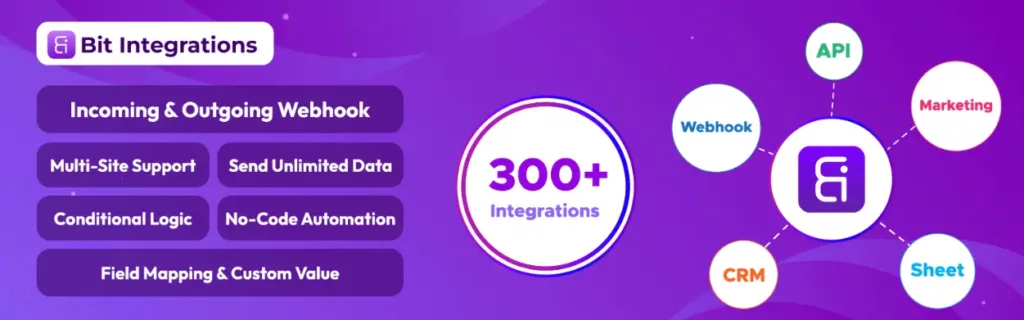
Bit Integrations is a no-code, one-to-one automation plugin for WordPress. It connects a single WordPress plugin as a trigger to a single action in one of hundreds of supported external apps.
It does not use a canvas and does not run multi-step workflows; each automation is one connection. It is simple to set up but technically much capable: it ships with a large library of integrations, plus custom hooks, custom PHP, bidirectional webhooks, and multi-site support, all self-hosted on your own WordPress server.
Bit Integrations connects with a large and continually growing library of apps and platforms, with new integrations added regularly. For the current, always-up-to-date count and the full list, see the official Bit Integrations all-integrations page. It has 20,000+ active installations and a strong rating on WordPress.org.
How it works
Each automation is one connection, built in three steps:
Trigger: choose the WordPress event that starts the automation (for example, a form submission). Conditions can be evaluated at this stage, so the automation only runs when your rules are met.
Action: choose what happens (for example, send the data to Google Sheets or create a CRM contact), and authenticate it.
Field mapping: map each trigger (source) field to the correct destination field, and inject custom static values where needed.
Once configured, triggered data is sent to the destination platform in real time, with no task or data limits.
Technical capabilities
Extenssinve integration library: across CRMs, email marketing, spreadsheets, eCommerce, LMS, form builders, page builders, and more.
Conditional logic: actions run only when your field-based if/then rules are met.
Field mapping with custom values: map trigger fields to action fields and set fixed custom values, not just 1:1 mapping.
Custom Trigger via a do_action hook: capture data from any plugin, even when it has no built-in trigger, by adding a custom do_action hook. This lets you automate plugins that aren’t natively supported.
Custom Action with custom PHP: execute your own PHP code when a trigger fires, with the trigger’s fields available inside your code.
Incoming and outgoing webhooks plus REST API: external apps can push data into WordPress, and WordPress can push data out to external platforms in real time.
Multi-site support: run automations across multiple WordPress sites.
Self-hosted: triggered data is processed on your own WordPress server, not a third-party cloud.
No task or data limits: send unlimited data with no per-task fees.
What Bit Integrations intentionally does not include: a visual canvas, multi-step or branching workflows, loops, parsers, or built-in AI. The model is deliberate, one trigger, one action, which keeps single-task automation fast, cheap, and predictable. When you need many steps, branching, or AI, that is where Bit Flows takes over.
Best for: beginners and small businesses automating clear single-step tasks (“send this form entry to a Google Sheet,” “add this new buyer to my email list”), as well as developers who want lightweight, code-extensible one-to-one automations via custom hooks and PHP.
What is Bit Flows?
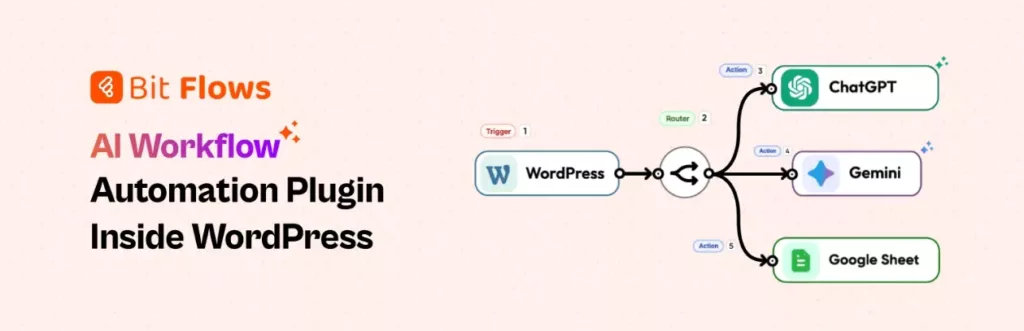
Bit Flows is a self-hosted, no-code visual workflow automation plugin for WordPress. A Zapier, Make, and n8n alternative that runs on your own server. A single trigger can fan out into many steps, branch down different paths, loop, pause, call AI, and wait for human approval, all on a drag-and-drop canvas.
Bit Flows connects with a large and continually growing library of app integrations, with new triggers and actions added regularly.
For the current count and full list, see the official Bit Flows integrations page. It is not limited to WordPress: from one builder, you can connect WordPress plugins, SaaS apps, CRMs, email tools, APIs, webhooks, and AI services, while your workflow data stays on your own site.
Core building blocks:
Visual canvas builder: drag, drop, and connect steps; no code required.
Multi-step, branching workflows: unlimited workflows, tasks, and connections.
Flow control: Router, Repeater, Iterator, Delay, and Schedule (cron-based) tools.
Parsers: JSON, CSV, and XML (Email Parser and PDF Parser are on the roadmap).
Data and logic: advanced conditional logic, dynamic field mapping, a Date-Time tool, and Flow/Math/System variables.
Developer tools: API and HTTP requests, incoming/outgoing webhooks, and a Custom App Builder for connecting services that aren’t natively supported.
Reliability: queue-based task processing, cloud cron, detailed workflow logs, failed-task notifications, workflow reports, re-execute, and import/export of flows and custom apps.
AI in Bit Flows: AI Agent, MCP Client, and Human-in-the-Loop
This is the clearest line between the two plugins. Bit Integrations has no built-in AI. Bit Flows does. Specifically:
AI Agent: an agent step that can analyze data, make decisions, call tools, and continue the workflow based on the result.
MCP Client: connect external Model Context Protocol servers and let the AI Agent use their tools inside a workflow.
Human-in-the-Loop: pause a workflow for a person to review or approve before it continues.
Direct AI integrations: OpenAI, Google Gemini, Anthropic Claude, DeepSeek, Perplexity, Groq, OpenRouter, and ElevenLabs.
Because Bit Flows is self-hosted, you run all of this on your own server instead of paying per-task fees to an external SaaS.
Best for: developers, agencies, and marketers running multi-step marketing funnels, eCommerce order processing, or AI-assisted automations.
Side-by-side comparison
Both plugins are no-code and run on your own WordPress server, but they solve different problems: Bit Integrations is built for fast, single-step connections, while Bit Flows is built for multi-step, branching, AI-driven workflows.
The table below compares them feature by feature so you can match the plugin to the kind of automation you actually need.
One-time license from $35/y or lifetime from $99 only
Annual from $59/yr or lifetime from $159
Best for
Beginners, small business, single-step tasks
Developers, agencies, multi-step & AI automation
Real-world examples
What Bit Integrations is great at (single-step):
Send Gravity Forms or Elementor entries or any other form submission straight to Google Sheets.
Push WooCommerce orders to a CRM or email platform.
Add new LMS students to a member’s email list.
Send a Slack alert when a product sells.
What Bit Flows is built for (multi-step):
A new lead arrives → Bit Flows checks their interest → adds them to the right CRM segment → sends an AI-written email → logs the result in a spreadsheet.
A WooCommerce order is placed → update stock → generate an invoice → add the buyer to your rewards program → notify sales in Slack — all in one flow.
Parse data from a webhook, run a bulk action across many items with an Iterator, or connect a service with no native integration via the Custom App Builder.
Community and support
Both plugins are backed by the same Bit Apps team, with documentation, video tutorials, an active Facebook community, forums, and live chat, plus email support.
Bit Integrations: 20,000+ active installations on WordPress.org and a strong base of five-star reviews. Because review totals change over time, see the current rating and reviews on its WordPress.org reviews page.
Bit Flows: a growing community with five-star reviews on WordPress.org. See its current WordPress.org reviews page for the latest count.
Which one should you choose?
Choose Bit Integrations if your needs are simple, single-step, and you want the lowest-cost, pay-once option: it is the faster path for “connect this one thing to that one thing.”
Choose Bit Flows if you need multiple steps, branching logic, loops, parsers, or AI, including its AI Agent, MCP Client, and Human-in-the-Loop steps, on a self-hosted visual canvas.
Many teams use both. You can try either on a free demo site before deciding.
Frequently Asked Questions (FAQs)
What is the main difference between Bit Integrations and Bit Flows?
Bit Integrations is for single-step automations. Bit Flows lets you build complex, multi-step automations with a visual builder and advanced logic.
Do I need to code?
No. Both are no-code. Bit Integrations uses a three-step wizard; Bit Flows uses a visual canvas. Bit Flows also offers optional developer tools (API, HTTP, Custom App Builder) if you want them.
Can I use AI?
Only Bit Flows has built-in AI. It includes an AI Agent, an MCP Client, and Human-in-the-Loop steps, and connects to OpenAI, Gemini, Claude, DeepSeek, Perplexity, Groq, OpenRouter, and ElevenLabs. Bit Integrations has no AI features.
Are the plugins free?
Both have free versions you can try from WordPress.org. To get all features, you can upgrade to Pro, then you get every trigger, action, and integration.
Which one should I choose?
Use Bit Integrations for easy jobs, like sending form data to a spreadsheet. Use Bit Flows for more steps or when you need AI or special logic, like a marketing funnel or big order system.
Is Bit Flows a SaaS or a WordPress plugin?
Bit Flows is a self-hosted WordPress plugin, not a SaaS. It connects to SaaS apps, APIs, and AI tools, but your workflows and data stay on your own server, a key difference from cloud tools like Zapier or Make.
He writes about WordPress, SEO, automation, and SaaS with hands-on experience. He creates tutorials, comparisons, and practical content by understanding real use cases, search intent, and AI visibility.
FluentCRM can tell you that a contact opened an email, clicked a pricing link, purchased a product, or entered an automation. But when that person asks for a custom quote, a different process begins. Someone must qualify the enquiry, take ownership of the opportunity, decide what to offer, calculate the price, schedule the next follow-up, […]
Building a WooCommerce store is exciting in the beginning. You install WooCommerce, upload products, connect a payment gateway, and feel like the hard part is done. Then you may need something that the core WooCommerce doesn’t cover. A customer abandons checkout because the process feels too plain. Another leaves because shipping costs look confusing. Someone […]
Choosing a WordPress LMS plugin is not as easy as it looks. Many plugins promise course building, quizzes, payments, and student management. But once you start comparing them, the differences become clear very fast. Some are easier to use. Some give you more control. Some are better for selling courses. Others work better for memberships […]
Cookie Consent
We use cookies to improve your experience on our site. By using our site, you consent to cookies.
This website uses cookies
Websites store cookies to enhance functionality and personalise your experience. You can manage your preferences, but blocking some cookies may impact site performance and services.
Essential cookies enable basic functions and are necessary for the proper function of the website.
Name
Description
Duration
Cookie Preferences
This cookie is used to store the user's cookie consent preferences.
30 days
Cookie Preferences
This cookie is used to store the user's cookie consent preferences.
30 days
Cookie Preferences
This cookie is used to store the user's cookie consent preferences.
30 days
This cookie is set by Cloudflare to help manage bot traffic and protect the website from malicious activity. It does not collect or store any personal data and is used solely for security and performance purposes.
Used to monitor number of Google Analytics server requests
10 minutes
__utmb
Used to distinguish new sessions and visits. This cookie is set when the GA.js javascript library is loaded and there is no existing __utmb cookie. The cookie is updated every time data is sent to the Google Analytics server.
30 minutes after last activity
__utmc
Used only with old Urchin versions of Google Analytics and not with GA.js. Was used to distinguish between new sessions and visits at the end of a session.
End of session (browser)
__utmz
Contains information about the traffic source or campaign that directed user to the website. The cookie is set when the GA.js javascript is loaded and updated when data is sent to the Google Anaytics server
6 months after last activity
__utmv
Contains custom information set by the web developer via the _setCustomVar method in Google Analytics. This cookie is updated every time new data is sent to the Google Analytics server.
2 years after last activity
__utmx
Used to determine whether a user is included in an A / B or Multivariate test.
18 months
_ga
ID used to identify users
2 years
_gali
Used by Google Analytics to determine which links on a page are being clicked
30 seconds
_ga_
ID used to identify users
2 years
_gid
ID used to identify users for 24 hours after last activity
24 hours
_gat
Used to monitor number of Google Analytics server requests when using Google Tag Manager
1 minute
_gac_
Contains information related to marketing campaigns of the user. These are shared with Google AdWords / Google Ads when the Google Ads and Google Analytics accounts are linked together.
90 days
__utma
ID used to identify users and sessions
2 years after last activity
Clarity is a web analytics service that tracks and reports website traffic.