Are you looking to accept subscription payments on your WordPress website?
Well, setting up a PayPal subscription on WordPress form is not so difficult. In this article, I will show you how to set up PayPal subscriptions on WordPress Form in the easiest way. Subscription services are a fantastic way to increase your business revenue. Bit Form + Paypal enables you to create a simple subscription payment experience for your customers.
Together they not only make financial planning simple but also improve the user experience. Here is a simple guide to adding and configuring subscriptions on your website. Let’s dive in!
How the Subscription Form Can Help You
Having a subscription form on your WordPress site with PayPal is really helpful. It lets people sign up and pay automatically for services like memberships or online courses they use regularly. You can also use it to control who will be able to access special content, like exclusive articles or videos, for paying members.
If you sell products that customers get regularly, like software subscriptions, it ensures payments happen automatically. This brings a steady income to your business and helps keep customers longer. And you can offer trial periods or discounts to attract new subscribers. Setting up a PayPal subscription form is easy and ensures smooth payments for both you and your customers.
Why You Should Have a Subscription Form
Using a PayPal subscription form on your website is a smart move to improve your business. It simplifies payments and increases customer satisfaction. Having a PayPal subscription form on your website has many benefits:
To Get More Revenue: with the regular income provided by subscriptions, you can plan your finances more reliably and scale your business.
Flexibility: Offer different subscription plans (Like monthly, yearly, etc.) to meet various customer needs. This plan attracts a wider audience and can increase your sales.
Customer Trust: PayPal is a trusted and widely used payment method, making it easy for customers to subscribe and pay.
Automated Billing: A PayPal subscription form automates billing, saving you time and reducing errors. Payments are collected on time without manual invoices.
Better User Experience: By integrating a subscription form, registering becomes easy and quick-as-a-snap for a happy customer who is likely to return customers.
Professional Look: A professionally made subscription form makes your business look more professional and reliable, motivating clients to subscribe.
Tools You Will Need
You’ll need a PayPal business account to accept payments and the Bit Form plugin for creating custom subscription forms. To install Bit Form you can just follow the plugin installation guide.
How to set up PayPal Subscriptions on WordPress Form Step-by-Step Guide:
Bit Form makes the PayPal subscription setup easy. Follow these simple steps to configure PayPal for both one-time and subscription payments through Bit Form.
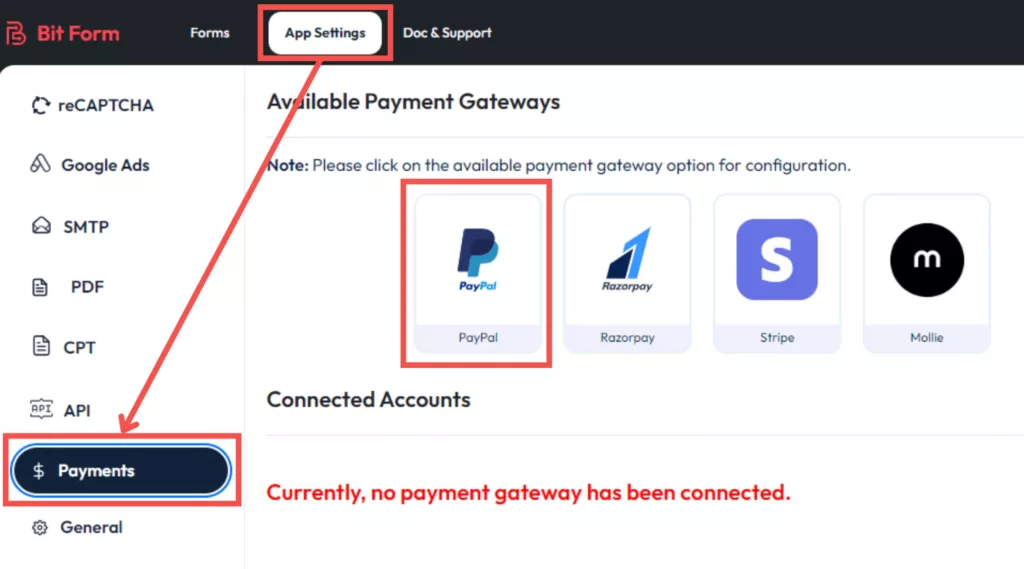
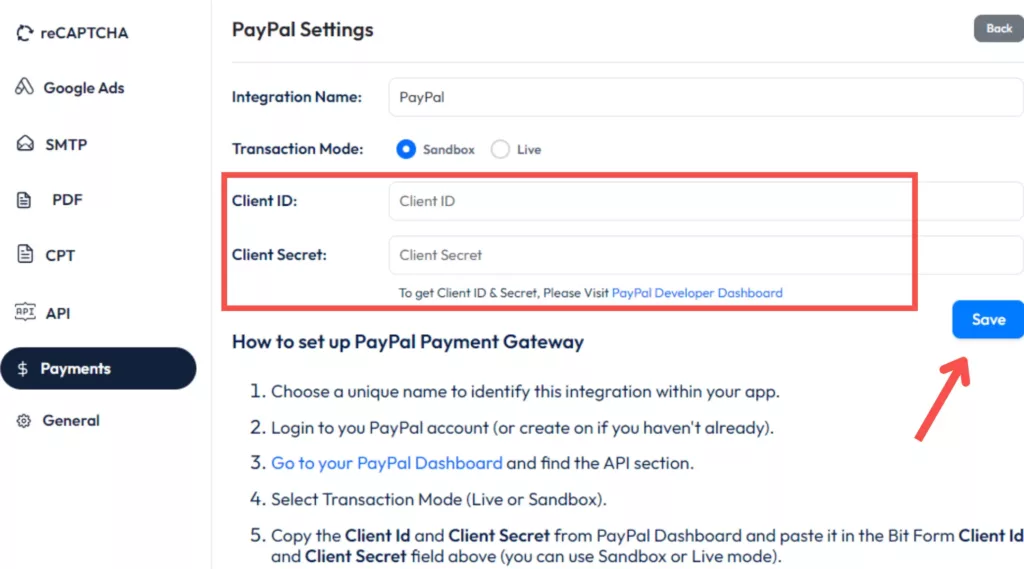
Navigate to Bit Form Dashboard: Go to App Settings and click on the Payments button. Select PayPal from the available payment options.
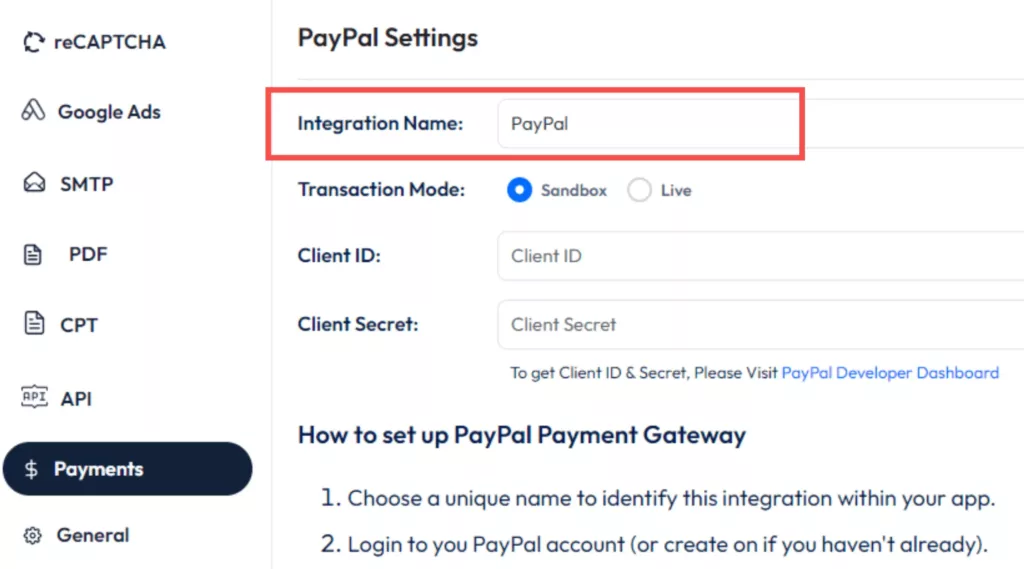
Provide a suitable Integration Name on the integration name field.
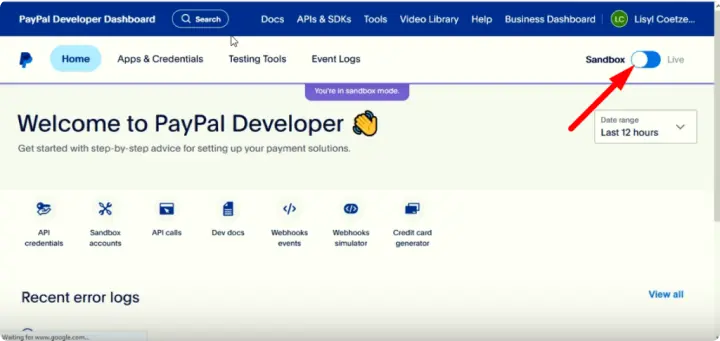
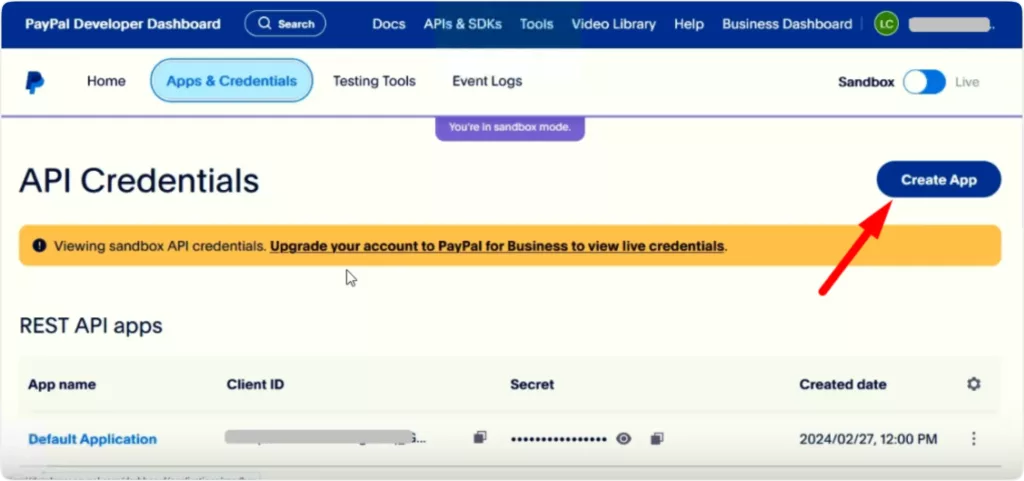
Create PayPal App: Log in to your PayPal Developer account, navigate to My Apps & Credentials, and choose Sandbox or Live mode.
Create a new app or use the default one. Obtain your Client ID following these steps: Set App Name> Select App Type> Create App> Get Client ID.
Copy Client ID and Secret: Copy the Client ID and Secret from PayPal and paste them into Bit Form’s PayPal settings.
Save Settings: Complete the PayPal configuration by clicking on the Save button.
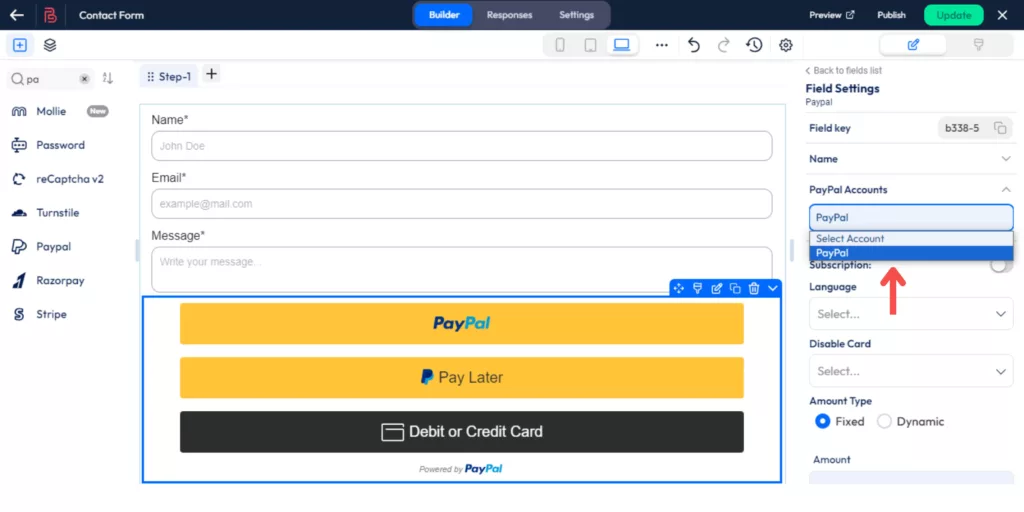
Add PayPal Configuration: From the Form Setting select the PayPal configuration that you created.
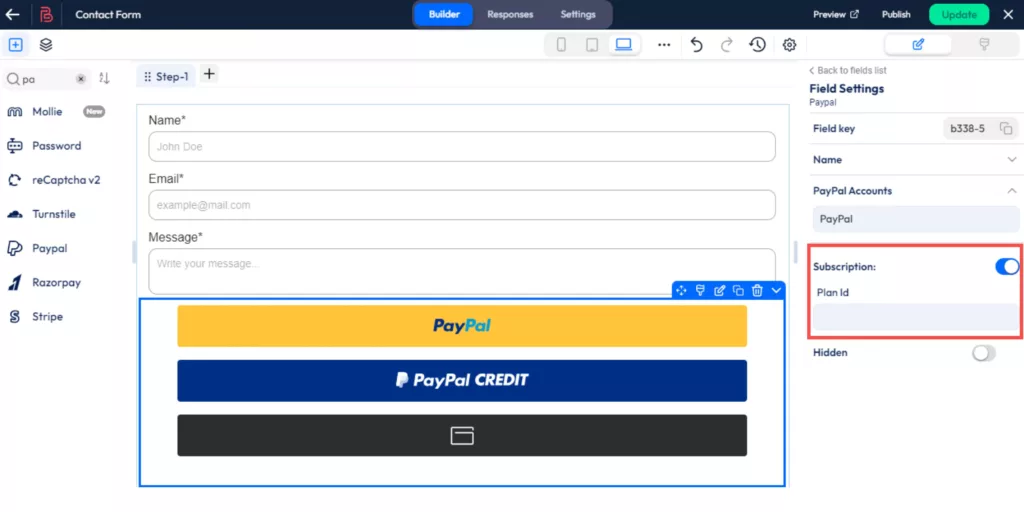
For Subscription Payments: Ensure you have a business account and add your Plan ID in the designated field to accept subscription payments.
For One-Time Payments
With PayPal, customers can pay for goods and services with a single payment for non-recurring purchases. Some of the key benefits are their simple usage and payment methods, such as credit cards, debit cards, and bank accounts. Pay with PayPal and get limited buyer protection for free along with great security features, such as payment limits and advanced order tracking.
It’s accepted globally, supporting multiple currencies and languages. Payments are processed instantly, avoiding delays common with bank transfers. PayPal’s fees are transparent, typically a small percentage plus a fixed fee, with no monthly charges for one-time payments. Integration into websites is straightforward with Bit Form, and the checkout process can be customized. With a trusted brand like PayPal on your side, it only adds to customer confidence making it a preferred choice in e-commerce and services. However, similarly, you can configure RazorPay and Stripe payments with the BIt Form for nonrecurring payments.
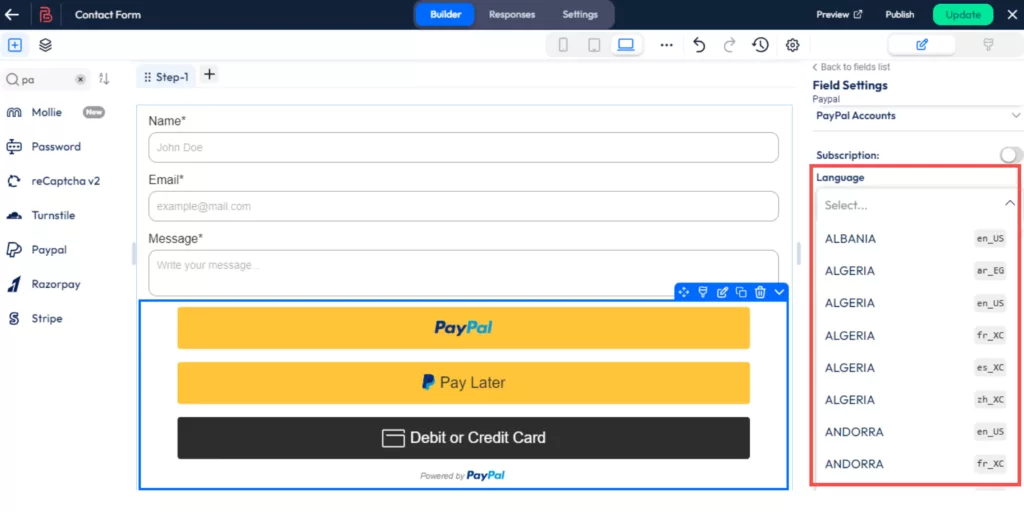
Language: Choose the preferred language for the payment field.
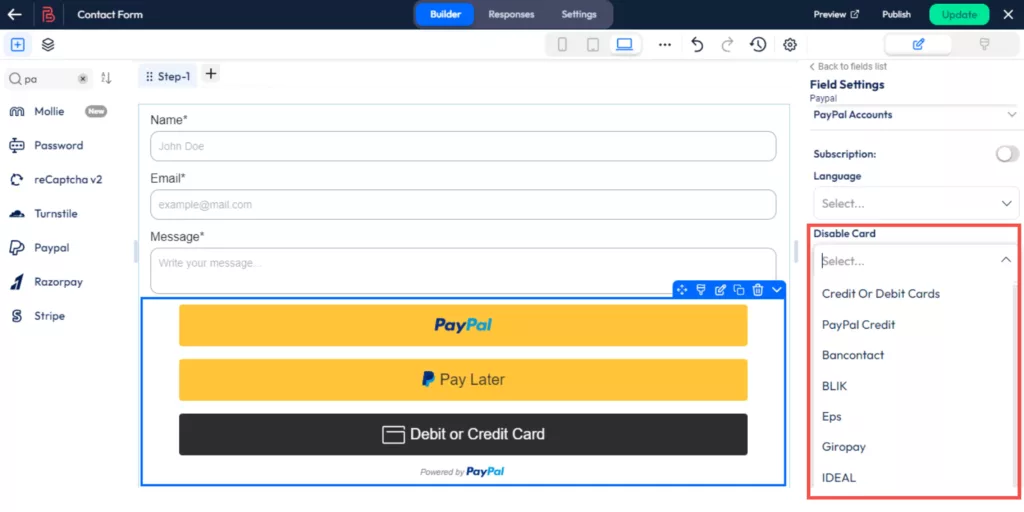
Disable Card: You can disable cards you do not wish to accept.
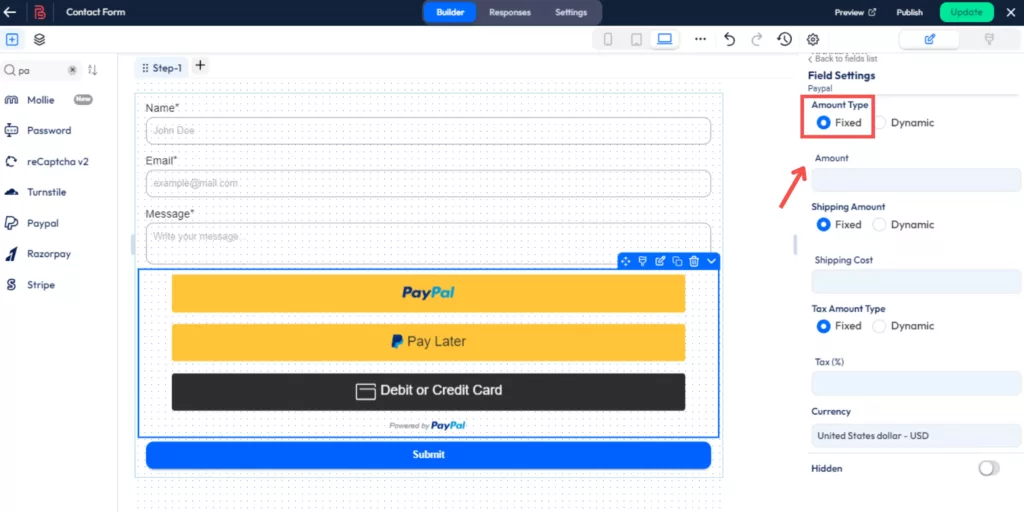
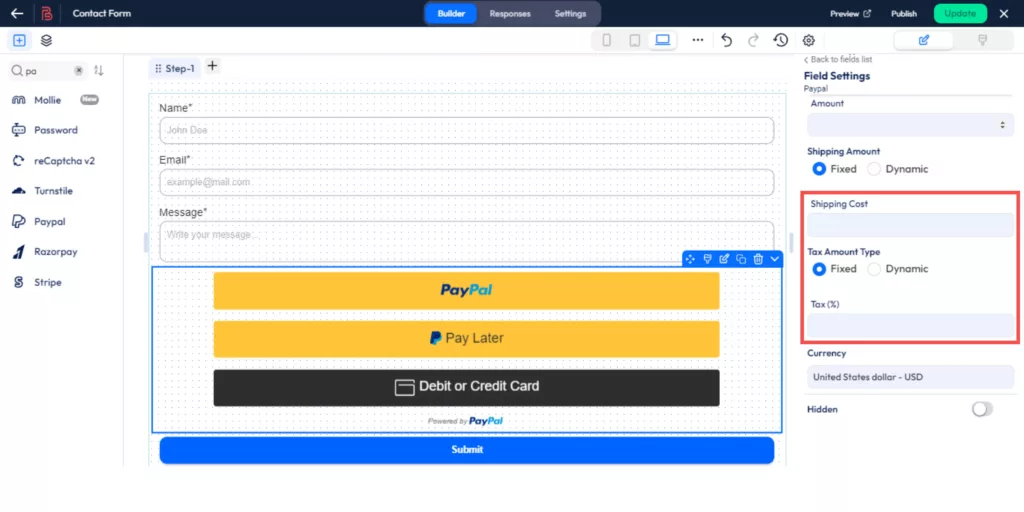
Amount Type: Fixed: Set a specific payment amount, useful for sales or set prices.
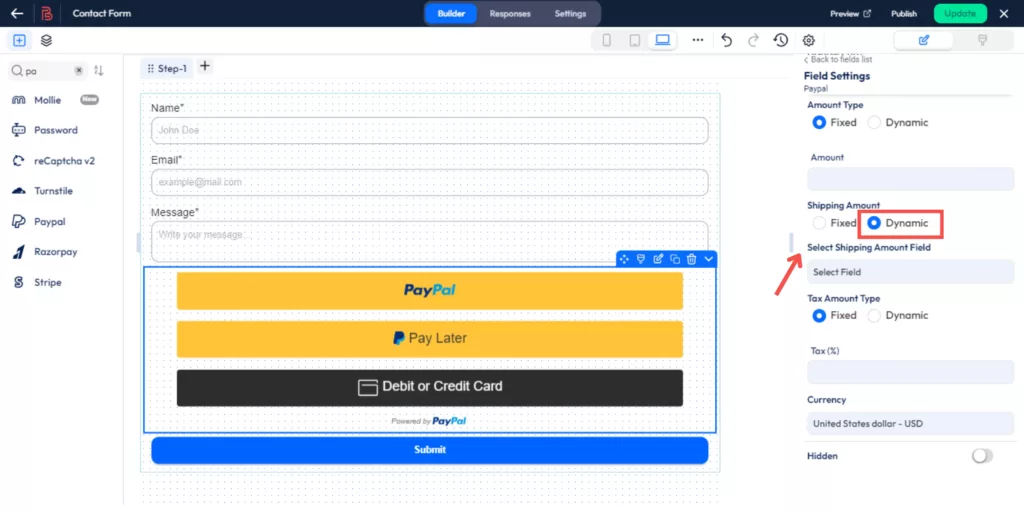
Dynamic: Use Number fields or Radio Buttons. By doing this you can add any amount you choose.
Shipping Cost & Tax: Similar to Amount Type, set fixed or dynamic shipping costs for shipping and taxes.
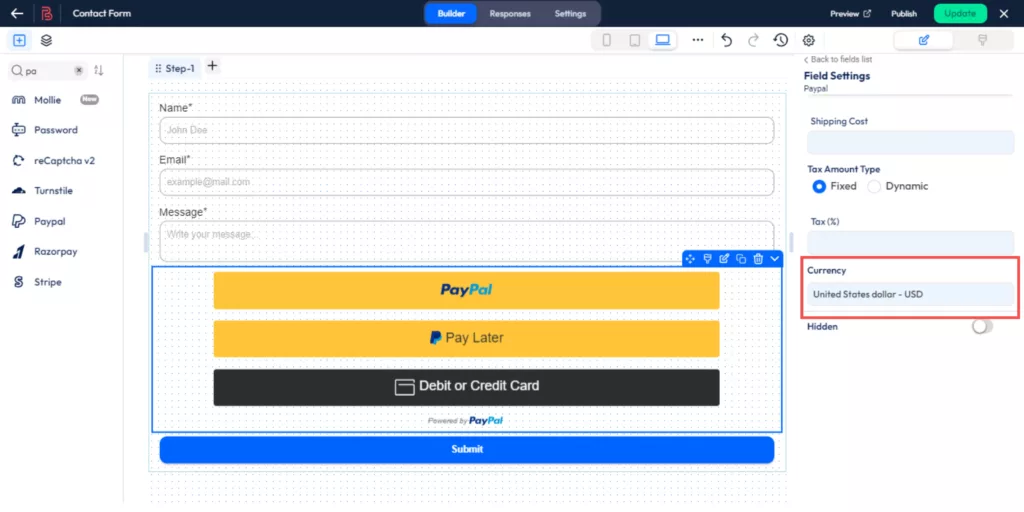
Currency: You can select your preferred currency from 26 different currency types.
By following these instructions, you’ll successfully configure and manage PayPal payments using Bit Form, you can configure both one-time and subscription payments as per your needs.
The Bit Form provides three additional payment gateways. They are Stripe, RazorPay, and Mollie. In your WordPress payment form, you can add them all using conditional logic. Any specific payment options selected by your users will trigger the display of that payment gate, while the other payment options will automatically disappear.
Wrap Up
Setting up subscription payments on your WordPress site with PayPal and Bit Form is a smart choice for any business. It helps you earn a steady income, offers flexibility with different plans, and automates billing, saving you time. Customers love the convenience and trust PayPal provides, making it easier for them to subscribe and pay regularly. Follow the steps outlined to integrate PayPal with Bit Form and enhance your website’s user experience to increase your revenue.
If you feel any problem in setting up PayPal or any payment gateways that Bit Form supports, just knock at [email protected]. We are always ready to help you.
He writes about WordPress, SEO, automation, and SaaS with hands-on experience. He creates tutorials, comparisons, and practical content by understanding real use cases, search intent, and AI visibility.
As 2025 comes to a close, it’s time to reflect on an incredible year at Bit Apps. This year wasn’t just about launching new features; it was about truly listening to our users, evolving our products, and delivering powerful solutions that help businesses grow. From Bit Form making form-building smarter to Bit Flows revolutionizing automation […]
Dear WordPress enthusiasts! What an unforgettable experience it was! WordCamp Dhaka 2025 is over, and wow, what an amazing event it was! From beginning to end, the energy, excitement, and community spirit were truly awesome. Bit Apps was proud to be part of this grand event as the Lalbagh Legacy (Platinum) Sponsor of WordCamp Dhaka […]
Black Friday 2025 is finally here, and it’s the best time to give your WordPress website the upgrade it deserves with huge discounts! If you’ve been thinking about improving your site’s design, automating tasks, or adding more functionality, this is the perfect opportunity. This Black Friday, you can grab amazing deals on the best plugins, themes, and automation […]
Cookie Consent
We use cookies to improve your experience on our site. By using our site, you consent to cookies.
This website uses cookies
Websites store cookies to enhance functionality and personalise your experience. You can manage your preferences, but blocking some cookies may impact site performance and services.
Essential cookies enable basic functions and are necessary for the proper function of the website.
Name
Description
Duration
Cookie Preferences
This cookie is used to store the user's cookie consent preferences.
30 days
Cookie Preferences
This cookie is used to store the user's cookie consent preferences.
30 days
Cookie Preferences
This cookie is used to store the user's cookie consent preferences.
30 days
This cookie is set by Cloudflare to help manage bot traffic and protect the website from malicious activity. It does not collect or store any personal data and is used solely for security and performance purposes.
Used to monitor number of Google Analytics server requests
10 minutes
__utmb
Used to distinguish new sessions and visits. This cookie is set when the GA.js javascript library is loaded and there is no existing __utmb cookie. The cookie is updated every time data is sent to the Google Analytics server.
30 minutes after last activity
__utmc
Used only with old Urchin versions of Google Analytics and not with GA.js. Was used to distinguish between new sessions and visits at the end of a session.
End of session (browser)
__utmz
Contains information about the traffic source or campaign that directed user to the website. The cookie is set when the GA.js javascript is loaded and updated when data is sent to the Google Anaytics server
6 months after last activity
__utmv
Contains custom information set by the web developer via the _setCustomVar method in Google Analytics. This cookie is updated every time new data is sent to the Google Analytics server.
2 years after last activity
__utmx
Used to determine whether a user is included in an A / B or Multivariate test.
18 months
_ga
ID used to identify users
2 years
_gali
Used by Google Analytics to determine which links on a page are being clicked
30 seconds
_ga_
ID used to identify users
2 years
_gid
ID used to identify users for 24 hours after last activity
24 hours
_gat
Used to monitor number of Google Analytics server requests when using Google Tag Manager
1 minute
__utma
ID used to identify users and sessions
2 years after last activity
_gac_
Contains information related to marketing campaigns of the user. These are shared with Google AdWords / Google Ads when the Google Ads and Google Analytics accounts are linked together.
90 days
Clarity is a web analytics service that tracks and reports website traffic.